
How to Build a Self-Improving AI Agent That Works While You Sleep
TL;DR
A self-improving agent is a Claude Code loop that runs once a night: it makes something, a critic scores it against your best examples, and it writes what it learned into a rulebook it reads tomorrow. This guide gives you the 5 parts every loop needs, the guardrails that keep it safe, a real example (my web page agent, 3 nights, 72 vs 77 out of 90), and 6 copy-paste prompts that interview you, build the loop, judge the work, run the night and schedule it on your Mac.
👉 https://www.skool.com/claudecodeclub

What a self-improving agent is
It is a Claude Code agent that gets better at one job every night, without you in the room. Each night it makes the thing, a judge scores it against your best examples, and the agent writes what it learned into a short rulebook. Tomorrow night it reads that rulebook first.
That's the whole idea. You wake up to a finished piece of work, a score, and a note on what changed. You don't need to know how to code. You need to know what good looks like for the thing you make, and this guide gives you the prompts that pull that out of your head and turn it into a working loop.
Who this is for: you already use Claude Code, or you're about to. You make the same kind of thing again and again (web pages, newsletters, scripts, thumbnails, proposals) and you want the next one to beat the last one.
What it is not: an agent that runs all day, spends money on its own, or posts for you. It wakes up once a night, works for a set time, and stops.
Where the idea came from: Karpathy's autoresearch
In March 2026, Andrej Karpathy released a repo called autoresearch. The README describes it as giving an AI agent a small but real LLM training setup and letting it experiment autonomously overnight. The agent changes the code, trains for 5 minutes, checks whether the result improved, keeps or throws away the change, and repeats. You wake up to a log of experiments and, hopefully, a better model.
The original loop. The repo has over 97,000 stars.
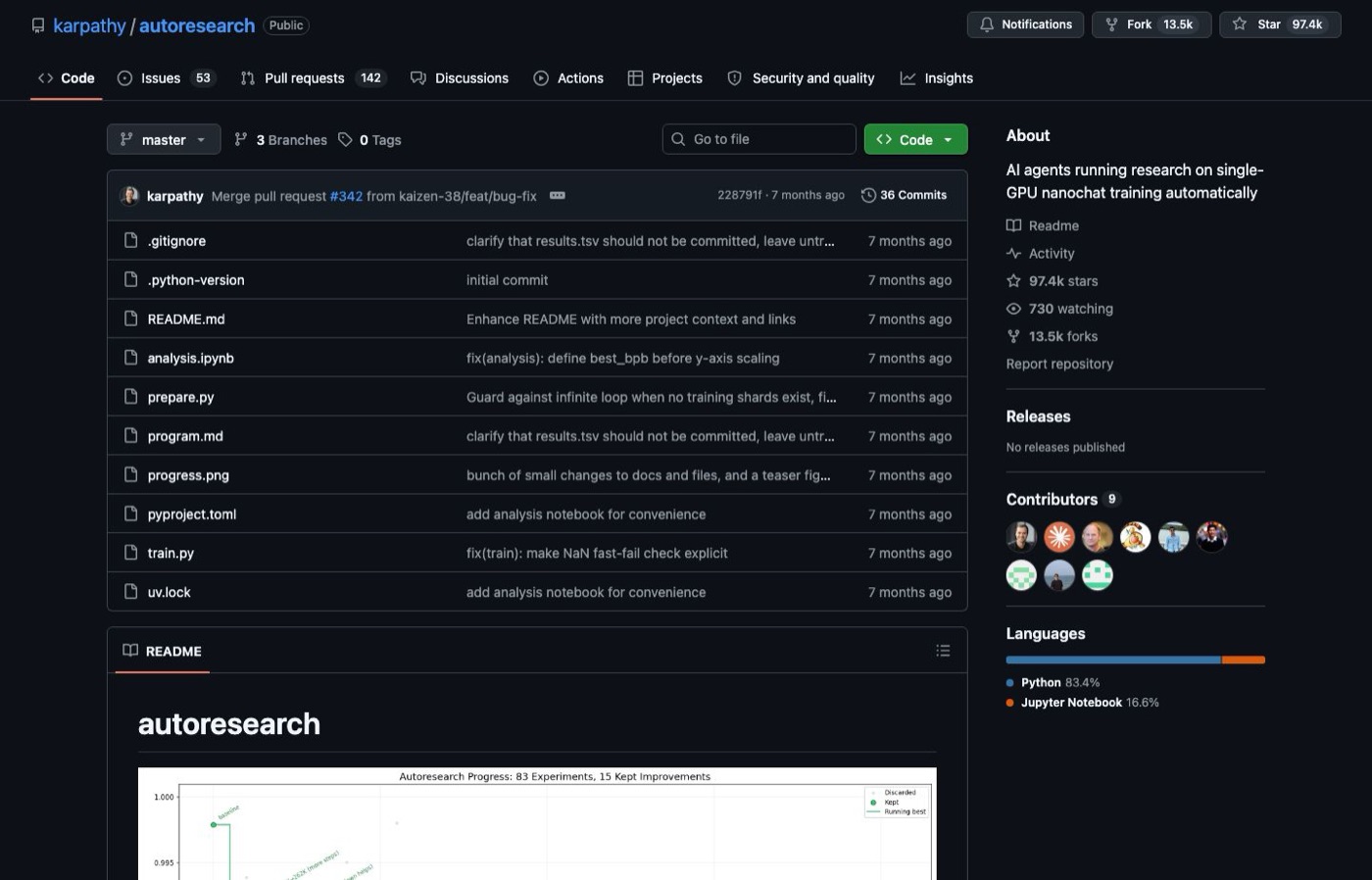
His launch tweet has the split that matters: the human iterates on the prompt (a .md file), and the AI agent iterates on the training code (a .py file). Two days later he wrote that he watched the agent work through about 700 changes on its own, found about 20 real improvements, and cut the time to reach GPT-2 quality from 2.02 hours to 1.80 hours. Those are his numbers, not mine.
- Launch tweet: https://x.com/karpathy/status/2030371219518931079
- Results tweet: https://x.com/karpathy/status/2031135152349524125
- The line that started everything for me: https://x.com/karpathy/status/2031137476438548874
That last tweet says you don't use autoresearch directly. It's a recipe: give it to your agent and apply it to what you care about. I knew it was powerful in March. It only clicked in October 2026, when I put the same loop on my own content.
The 5 parts every loop needs
Karpathy's loop works because the score is a number the computer can measure. Most of what you and I make has no such number. A web page isn't faster or slower, it's better or worse. So my loops add a judge and a rulebook. Every working loop I've built has the same five parts.
- 1The thing it makes. One kind of output, made the same way every night: a web page, a newsletter issue, a script.
- 2A judge. A critic prompt that scores the output against a fixed rubric and puts it side by side with your best examples.
- 3A rulebook it writes lessons into. A short file the agent reads before it makes anything and edits after it learns something, one cited line per lesson.
- 4One experiment per night. One focus area at a time, rotating, so a good or bad result has one cause.
- 5A schedule. It runs once a night, works for a set time, and stops. It's not always on.
Everything else in this guide is detail on those five. If you remember nothing else, remember that a loop without a judge just produces more output, and a loop without a rulebook forgets everything by morning.
Build the judge first
The judge decides whether the loop gets better or just gets busy, so it comes first. It has two pieces.
A rubric. Eight to ten categories, each scored 0 to 10, with a plain description of what a 10 looks like and what a 3 looks like for your work. My web page critic scores categories like clarity, visual craft, motion, typography and narrative. Yours will be different. The interview prompt below builds yours from your own answers.
Benchmarks. Three to five of the best examples you can find, from you or from people you want to beat. Before the critic scores anything, it puts tonight's output next to three benchmarks and answers one question: which looks better, ours or the benchmark? If the benchmark wins, the craft scores are capped at 5. This one rule stops the most common failure, a critic that is too kind to its own agent.
Calibrate the scale out loud: 5 means competent, 7 means equal to your benchmarks, 9 or more means clearly better. Most nights should land between 4 and 6 until the work really catches up. And only compare numbers that were scored on the same scale.
Give it a rulebook it can rewrite, with receipts
The rulebook is where the self-improving part lives. It's one plain file that the agent reads at the start of every night and edits at the end. Mine has a cap of 60 lines, one lesson per line, and every line carries where it came from. My agent can also rewrite my taste rules as it learns: the look, the story, the layouts, the copy, even its own critic rubric and craft guardrails. That's the point of the loop, so I let it.
These are real lines my web page agent wrote to itself, word for word:
- "[P57] Mechanism changes move the score, polish does not. After round 3, flag a fix only if it changes a category score; otherwise stop"
- "[P56] A fix on a click path is verified with the click shot, not the no-input shot. Four rounds re-fixed the same button blind"
- "[P28] Generated images are the page's light source. Zero images loses the side-by-side and caps visual craft and wow at 5"
Two rules keep the rulebook honest. The cap forces it to replace weak lessons instead of piling up new ones. And the source rule: a line only changes when the agent can cite a score, a critique or one of your notes.
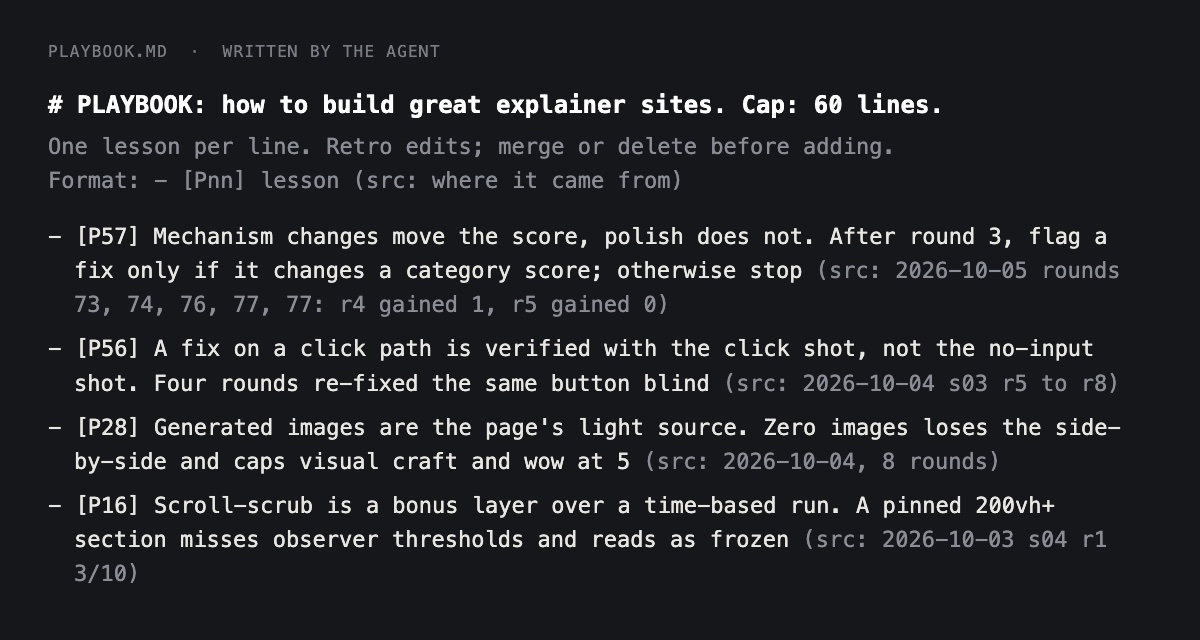
Every rule change comes with receipts. These are the rules I use for my web page agent:
- One line at a time. It changes single lines. It never deletes a file or rewrites a whole one in a single night.
- Every change cites why. The line ends with (src: date and the evidence) or (src: feedback doc and the date).
- Evidence edits need a measurable score effect from a full night. One lucky round isn't enough. My notes in the feedback doc apply directly, since they're my taste.
- Every change is listed in the morning report and saved in git, so you can see it and undo it.
- A small core stays off-limits: the file that says who the agent serves, the rules file every run reads (CLAUDE.md), the settings file, the engine scripts, and the hard limits: never publish, post or push, and never delete.
A judge that can change its own rubric could quietly make itself easier. The receipts are what stop that: if a rubric line changes, you can see the score that justified it, and you can revert it.
Run one experiment a night, on one focus area
Pick 5 to 7 areas where your output can improve. For my web pages they are clarity, composition, interaction, motion, narrative, style and typography. Each night the agent works on one area, tries one change, and compares the score with the best so far on that area.
- 1It studies the weakest area against your best example and plans a few upgrades.
- 2It makes the thing with those upgrades.
- 3The critic scores it. The agent fixes the three worst problems and the critic scores again, up to a set number of rounds.
- 4In the retro, it keeps the change if the score beat the best on that area, and kills it if not, writing the reason either way.
One focus per night matters because a night that changes five things teaches nothing. When the score moves, you know why.
Steer it with a feedback doc
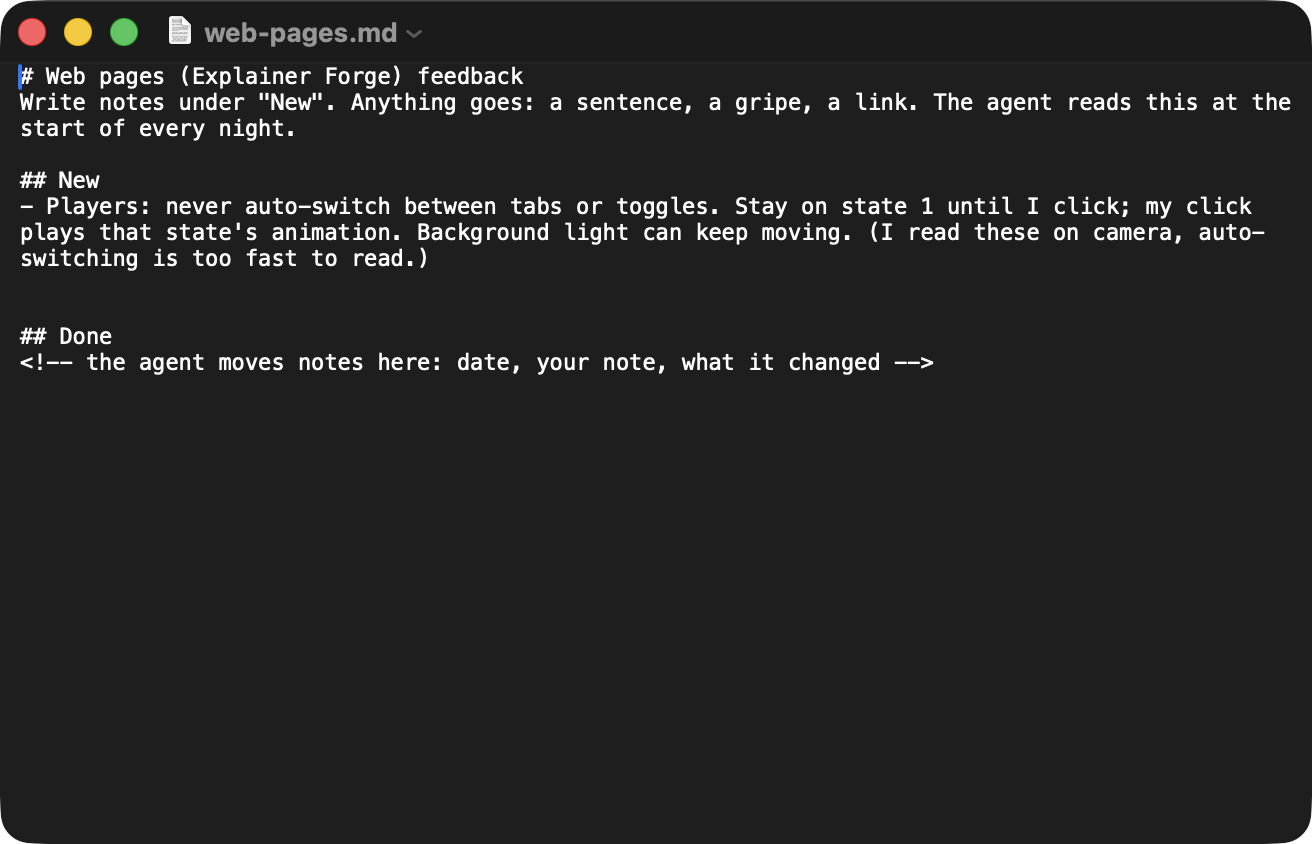
The feedback doc is a plain notes file with two headings, New and Done. You write a gripe, a sentence or a link under New whenever you think of it. The agent reads that file first every night, before anything else.
- If New has notes, they outrank the critic and the focus rotation that night. The agent turns each note into a concrete change in the rulebook or tonight's focus.
- At the end of the night, it moves each handled note to Done as one line: the date, your note, and what changed.
- A note it couldn't handle stays in New with a short line under it saying why or what it needs.
- It never deletes or rewords your words. It only moves notes and adds its own line.
This is how I steered the web page agent: fonts went through a font lab and landed on one clean pair, I asked for more contrast, then a page 20 percent smaller, then less linear, and eventually a story that flows like I'm explaining it to a friend. Each of those was one sentence in a notes file.
Set the guardrails before the first night
Guardrails are the few hard rules that make an unattended agent safe to leave alone. Write them down before you build anything, because the agent follows them without being asked twice.
- Caps. A time limit per night (mine is 120 minutes for the web page agent, and the Substack one has a 30 minute hard stop), and a cap on anything that costs credits. My web page agent can make 6 images a night, and a small script enforces it.
- What it may change. Its rulebook, its focus files, and single lines of your taste rules and critic rubric, each with a cited reason. It may never touch the settings file, the engine scripts, the file that says who it serves, or the hard limits.
- Every rule change says why, and is saved so you can undo it. The agent cites a source on every edited line, lists each change in the morning note, and the night ends with one git commit. If a change hurts, you ask Claude to revert that commit.
- Nothing publishes until you flip a switch. The agent writes local files. It never posts, emails, sends or deploys, and the settings file blocks git push outright. My newest loop, for Substack, won't post anything until I flip a switch once, and even then autopilot unlocks in stages, starting after seven passing nights in a row.
- It runs on your plan. The nightly job uses claude -p, Claude Code's non-interactive mode, so it draws on your Claude plan. Check your plan's usage limits and start with small caps.
A real example: my web page agent, 3 nights
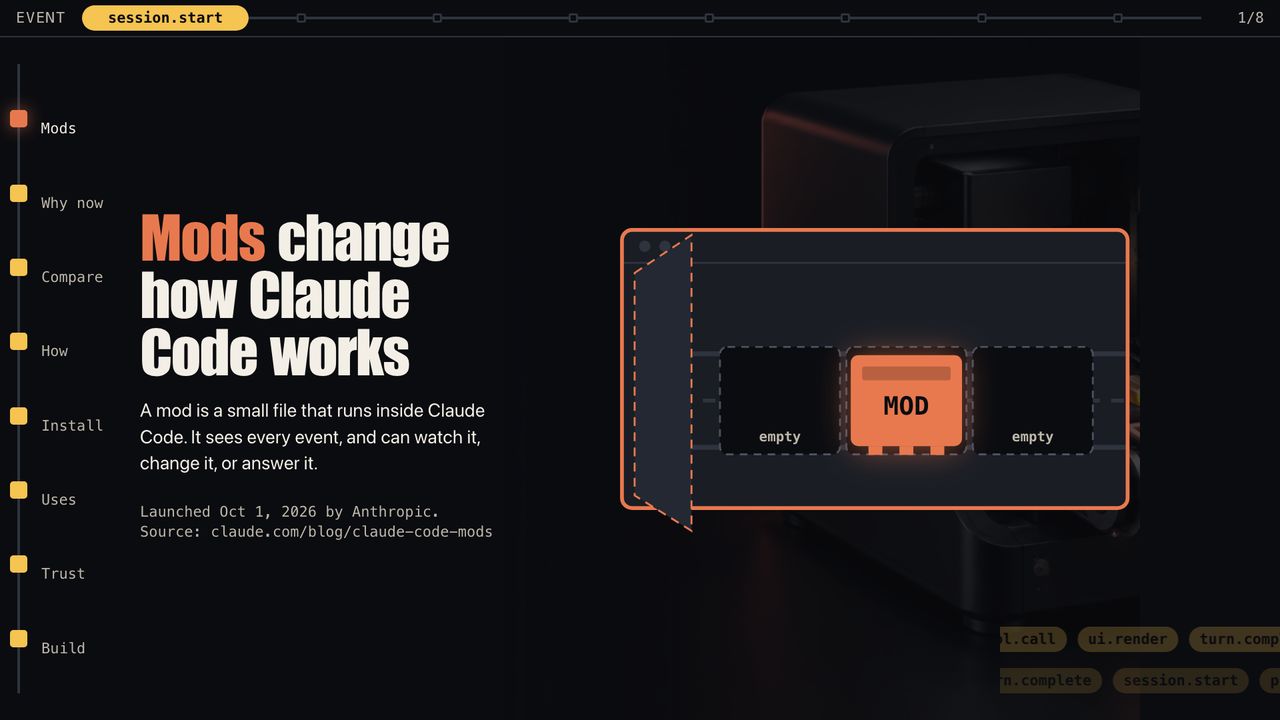
I built a loop called Explainer Forge. Every night at 1:00am it picks a Claude Code topic and builds an explainer web page for me to scroll on camera. Each step is a separate Claude call, and files are the only handoff between them: pick a topic, research it, study the weakest area against the best page so far, write a brief, make images and the page shell, build each section in parallel, simplify the words, take screenshots and a scroll video, score it, fix it in rounds, then run the retro where the agent edits its own rulebook and commits.
A stronger model directs and judges. A cheaper, faster one builds. My taste files (look, story, layouts, copy, the critic rubric, the guardrails) are rules the agent can now rewrite itself, one cited line at a time, and every change is listed in the morning note and saved in git. Only a small core is off-limits: the file that says which audience it serves, CLAUDE.md, the settings file and the engine scripts.
What the first three real nights did:
- Night 1, October 3, Claude Code mods. 37, then 43, then 45, on an older 60 point scale (so don't compare it to the others). I said it was not premium, jargon-heavy and nowhere near my benchmark.
- My hand-built versions, same day. 60, 68, then 72 out of 90. That became the bar to beat.
- Night 2, October 4, Pi 1.0. 56, then 64 over 8 rounds. It made zero images, and it did not beat 72. It ran about 77 minutes.
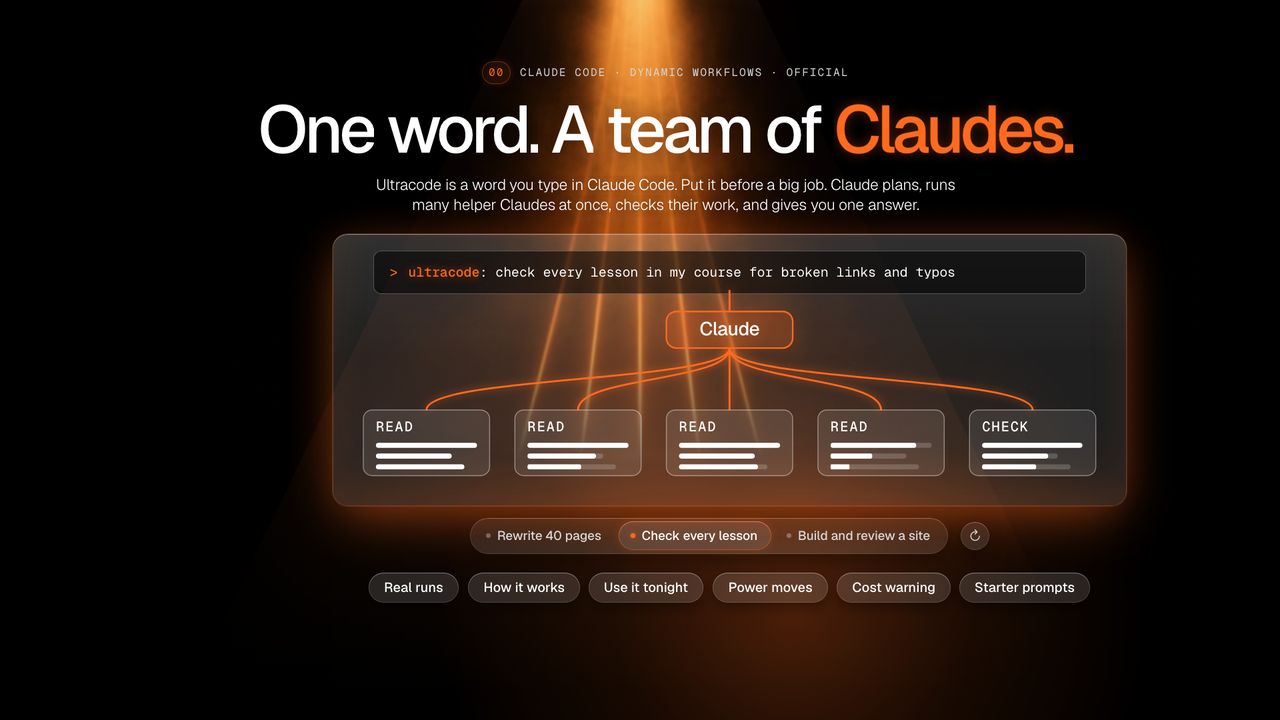
- Night 3, October 5, Ultracode. 73, 74, 76, 77, 77 out of 90. It beat the best, 77 against 72. It ran about 60 minutes and made 5 images.
The 90 is nine scoring categories. I've since added a tenth, narrative, so new scores are out of 100. These are my critic's scores, not audience data, and one of the three nights failed to beat the bar. That's the honest shape of a loop: most of the gain comes from the lessons it writes down, not from any one night.
I'm running the same loop on short videos and on Substack Notes. The Substack one is brand new, so I have no results to show you yet.
Set up Claude Code and make your loop folder
You need three things: a Mac, Claude Code, and a folder. Everything else is a prompt you paste.
- 1Open Terminal. Press Command and Space, type Terminal, press Return. It's a text window. You'll only paste a few lines into it.
- 2Install Claude Code. Paste this line and press Return: curl -fsSL https://claude.ai/install.sh | bash. Then type claude --version. You should see a version number. If you see "command not found", close Terminal, open it again and retry. Claude Code needs a paid Claude plan or API credits.
- 3Make the folder. Paste: mkdir -p ~/my-loop && cd ~/my-loop. This is your loop's home. One loop, one folder.
- 4Start Claude Code in it. Type claude and press Return. The first time, it asks you to log in through your browser. You should then see a box with a blinking cursor where you type. Paste the prompts below into the chat, one at a time.
bashcurl -fsSL https://claude.ai/install.sh | bash
claude --version
mkdir -p ~/my-loop && cd ~/my-loop
claude
The folder will end up looking like this. You don't create any of it by hand. The prompts do.
textmy-loop/
  CLAUDE.md          rules every night must follow (off-limits)
  AUDIENCE.md        who it serves (off-limits)
  GUARDRAILS.md      hard limits (off-limits) + craft rules
  RUBRIC.md          the critic's scorecard (edit one line, cite why)
  benchmarks/        your best examples (read-only)
  PLAYBOOK.md        the rulebook (agent edits, cited)
  axes/              one short file per focus area (agent edits)
  FEEDBACK.md        your notes: New and Done
  prompts/           critic.md, morning.md
  nightly-run.md     the one prompt the schedule runs
  runs/              one folder per night: the work, score, retro
  ledger.jsonl       one line per night
  MORNING.md         the 3 line report
Prompt 1: Let Claude interview you and write your rubric
Start here. This prompt interviews you about what you make, what good looks like and who your best examples are, then writes your rubric, your rules and the first version of the rulebook. Answer in short sentences. Put your best examples in the folder first if you have files, or have their links ready.
promptI want to build a self-improving agent: a Claude Code loop that makes one kind of thing for me every night, scores it honestly, and writes what it learns into a rulebook. Before we build anything, interview me, then write the files that will run the loop.

How to interview me: ask ONE question at a time and wait for my answer. Short answers are fine. If an answer is vague, ask one follow-up for a real example. Never invent details for me. If I don't know, write "not sure yet" and move on.

Ask about these, in this order:
1. What the agent makes each night. One kind of thing (a web page, a newsletter issue, a short video script, a proposal). If I list several, make me pick one.
2. Who it is for, and what that person should think, feel or do after seeing it.
3. What "good" looks like: ask me to describe the best example I have ever made or seen, in plain words.
4. My best examples: ask for 3 to 5 real ones (files in this folder or links), from me or from people I want to beat. For each, ask what makes it great. If I have none, help me find candidates, but I must confirm every one.
5. What "bad" looks like: 2 examples or traits that make me cringe.
6. What must never change (brand, voice, facts, structure, banned words). These become craft rules. Separately, ask who this is for and what they need; that goes in AUDIENCE.md and the agent may never change it.
7. What the agent is free to change.
8. The areas it could improve, 5 to 7 of them. Suggest some based on my answers; I pick.
9. Hard limits: the maximum minutes per night, the maximum paid generations (images, etc.) per night, and anything it may never touch, send or publish.

When you have everything, read it back as a one-screen summary and ask "anything wrong?". Fix what I flag. Then write these files in the current folder, creating folders as needed:
- RUBRIC.md: the critic's scorecard. 8 to 10 categories chosen from my answers, each scored 0 to 10, with what a 10 looks like and what a 3 looks like for MY work. State that 5 means competent, 7 means equal to my best examples, and 9 or more means clearly better. Add the side-by-side rule: before scoring, put tonight's output next to 3 benchmarks and answer "which looks better, ours or the benchmark?". If the benchmark wins, cap the craft categories at 5.
- benchmarks/INDEX.md: my best examples, the file or link for each, and one line on why each is great.
- PLAYBOOK.md: the rulebook. Seed it with 5 to 8 lessons taken from my answers, one line each, numbered [P01], [P02] and so on, each ending with (src: my interview). Put this header at the top: "Cap: 60 lines. One lesson per line. Replace weaker lines instead of adding new ones. Every line needs a source."
- AUDIENCE.md: who this serves and what they need, in my words. The agent may never change it.
- GUARDRAILS.md: two headings. "## Hard limits (off-limits)": the time and paid-generation caps and the never-publish, never-delete rules, numbered. "## Craft rules": my rules from question 6, numbered, one line each, that the agent may edit one line at a time with a cited reason.
- axes/: one short file per improvement area, each with the headings "Current standard", "Tried and dropped" and "Next ideas", mostly empty.
- FEEDBACK.md: two headings, "## New" and "## Done", and one line of instructions: I write notes under New, and the agent moves handled ones to Done.

Do not build the nightly runner yet. When you finish, list the files you wrote and tell me the next step.
What you should see: Claude asks one question, you answer, it asks the next. After about nine questions it reads a summary back. Say what is wrong, then it writes the files and lists them. If it asks two questions at once, reply "one at a time, please".
Prompt 2: Build the loop folder around your files
This prompt reads the files from Prompt 1 and builds the rest: the rules every night follows, the retro that writes lessons, the run folders, the ledger and the git history that lets you undo any change. It checks that Prompt 1 happened first.
promptBuild the nightly improvement loop around the files in this folder.

First check that RUBRIC.md, PLAYBOOK.md, GUARDRAILS.md, FEEDBACK.md, benchmarks/INDEX.md and the axes/ folder all exist. If any is missing, stop and tell me to run the interview prompt first. If they exist, read all of them, then:

1. If this folder is not a git repo, run git init and make a first commit of what exists.
2. Create CLAUDE.md: the rules every nightly run must follow. It must say: read FEEDBACK.md first and let any notes under New decide the night's focus; copy the hard limits from GUARDRAILS.md into it word for word; CLAUDE.md, AUDIENCE.md, settings.json, nightly.sh, the "Hard limits" part of GUARDRAILS.md and everything in benchmarks/ are off-limits and never edited; the agent may edit PLAYBOOK.md, the files in axes/, the "Craft rules" part of GUARDRAILS.md and RUBRIC.md, but only one line at a time, never deleting or rewriting a whole file in one night; every rule change must end with (src: date and the evidence) or, for my feedback notes, (src: feedback doc and the date); a change based on evidence needs a measurable score effect from a full night, while a feedback note applies directly; every change is listed in the morning report and saved in git so I can undo it; never publish, post, send, email, deploy or push anything; never leave this folder; stop when the time limit in GUARDRAILS.md is reached.
3. Create the folder runs/ (each night gets a subfolder named with the date), an empty ledger.jsonl, and an empty MORNING.md.
4. Create prompts/retro.md: instructions for the retro phase. It must say: for tonight's experiment, compare the score with the best so far on the same scale and decide keep or kill, with evidence; edit PLAYBOOK.md (replace weaker lines, never stack, stay within 60 lines, every line cites the run and the score or the feedback note it came from); where the evidence calls for it, change single lines of the Craft rules in GUARDRAILS.md or of RUBRIC.md, each ending with (src: date and evidence) or (src: feedback doc and the date), listing every such change in one line under a "Rule changes" heading in the night's retro file; update tonight's axes/ file (promote what worked to "Current standard", move what failed to "Tried and dropped", refresh "Next ideas"); move each handled note in FEEDBACK.md from New to Done as one line like - DATE: "note" -> what changed, file name, never rewording my text, and leave any note it could not handle in New with an indented line starting "agent:" that says why; append one line to ledger.jsonl (date, score, best score before, whether it beat the best, files changed); then make one git commit named for the night, so any change can be undone by reverting that commit.
5. Do NOT schedule anything and do NOT run anything yet.

Finish by showing me a tree of the folder, and the three files I should read before the first run.
What you should see: Claude asks permission to create files (say yes), then prints a folder tree that matches the one above. If it stops and says a file is missing, go back to Prompt 1. Open CLAUDE.md and read it once: it is the rulebook of rules, in plain English.
Prompt 3: Create the critic that scores side by side
This is the judge. It saves a critic prompt into your folder. The nightly run hands it to a fresh helper every time, so the judge never sees the agent's excuses, only the output. You can also use it by hand on anything you made: ask Claude to read prompts/critic.md and judge a folder.
promptSave everything between the START and END lines below as prompts/critic.md in this folder, word for word. Then confirm the file exists. Do not run it yet.

START
You are the critic for this loop. You are a ruthless judge and a confused first-time viewer at the same time. You judge only what is in the run folder you are given (the output, screenshots, previews). You never edit the output, the rubric or the benchmarks.

Step 1: the side-by-side test. Do this BEFORE scoring. Open RUBRIC.md and benchmarks/INDEX.md. Pick 3 benchmarks. Put tonight's output next to them and answer honestly in one word: "which looks better, ours or the benchmark?" Write the answer and one sentence of reasoning in critique.md. If the answer is "benchmark", cap every craft category at 5 and say so.

Step 2: score. Score every category in RUBRIC.md from 0 to 10, using its descriptions of a 10 and a 3. Calibration: 5 is competent, 7 is equal to my benchmarks, 9 or more is clearly better. Most nights should land 4 to 6 until the work really catches up. Grade what you can see, not effort or intent. If a guardrail in GUARDRAILS.md is broken, cap that category at 4.

Step 3: the fixes. For each weak category, write ONE fix as an exact instruction a builder can follow without asking questions: what to change, where, and to what. Prefer fixes that remove clutter over fixes that add things. Maximum 5 fixes, worst first. Write null for a category that needs nothing.

Step 4: compare. Read ledger.jsonl for the best total so far. Only compare scores on the same scale; if the rubric has changed since, say so and re-score the best once. beats_best is true only if tonight's total is higher than the best total AND the side-by-side answer is not worse than the best's.

Output: write critique.md (the side-by-side answer, scores with one line of evidence each, the fixes) and score.json with {"categories": {...}, "total": n, "side_by_side": "ours or benchmark", "fixes": [...], "beats_best": true or false} into the run folder you were given. Be harsh. A kind critic ruins the loop.
END

When you are done, tell me how to run it by hand: I paste "Read prompts/critic.md and judge the folder runs/[date]".
What you should see: Claude says it saved prompts/critic.md and tells you the line to run it by hand. Nothing is scored yet.
Prompt 4: Run the first night by hand, then save it as the nightly job
This is the nightly prompt. Paste it once and Claude saves it as nightly-run.md, then follows it right now as a test. Watch the first run live. Fixing it while you can see it is much easier than finding out at 7am that it stalled.
promptFirst, save everything between the START and END lines below as nightly-run.md in this folder, word for word. Then follow those instructions right now, once, as a test run for tonight.

START
You are the nightly agent for the improvement loop in this folder. In these instructions, [NIGHT] means today's date as YYYY-MM-DD, worked out fresh each time you run. Work alone, finish, and stop. Do not ask me questions; if something is unclear, make the safest choice and write it down in the morning report.

Before anything: read CLAUDE.md and GUARDRAILS.md, and obey them. CLAUDE.md and the hard limits in GUARDRAILS.md are off-limits; you may never edit them. Also check that prompts/critic.md and prompts/retro.md exist. If either is missing, stop and write that to MORNING.md.

1. Read FEEDBACK.md. If there are notes under "## New", they outrank the focus rotation tonight: turn each note into a concrete change to PLAYBOOK.md, a single line of the Craft rules or RUBRIC.md ending with (src: feedback doc and the date), or tonight's focus. If New is empty, carry on.
2. Pick tonight's focus. Read ledger.jsonl and choose the next area in axes/ after the one that ran last (rotate in order). Notes from step 1 override this. Create the folder runs/[NIGHT]/ and write focus.md into it: the area, the one change I will try, and why.
3. Read PLAYBOOK.md and the focus area's axes/ file. Study the weakest point against the best example in benchmarks/INDEX.md. Plan up to 3 upgrades for the focus area and write them into runs/[NIGHT]/plan.md.
4. Make tonight's thing, following the playbook and the plan. Save it in runs/[NIGHT]/. Stay inside every limit in GUARDRAILS.md (minutes and paid generations).
5. Judge. Start a fresh subagent and give it exactly the instructions in prompts/critic.md and the path runs/[NIGHT]/. Wait for critique.md and score.json.
6. Fix, then judge again. Apply only the fixes from the critique (at most 3 rounds in total). After each round start a fresh critic subagent on the new version. Stop early if a round does not raise the score, or if the time limit is close.
7. Retro. Follow prompts/retro.md exactly for tonight's run: keep or kill the experiment, edit PLAYBOOK.md and the axes/ file with sources, change rule lines only as the retro instructions allow and list each one, move handled notes in FEEDBACK.md to Done, append the ledger line, and make the git commit.
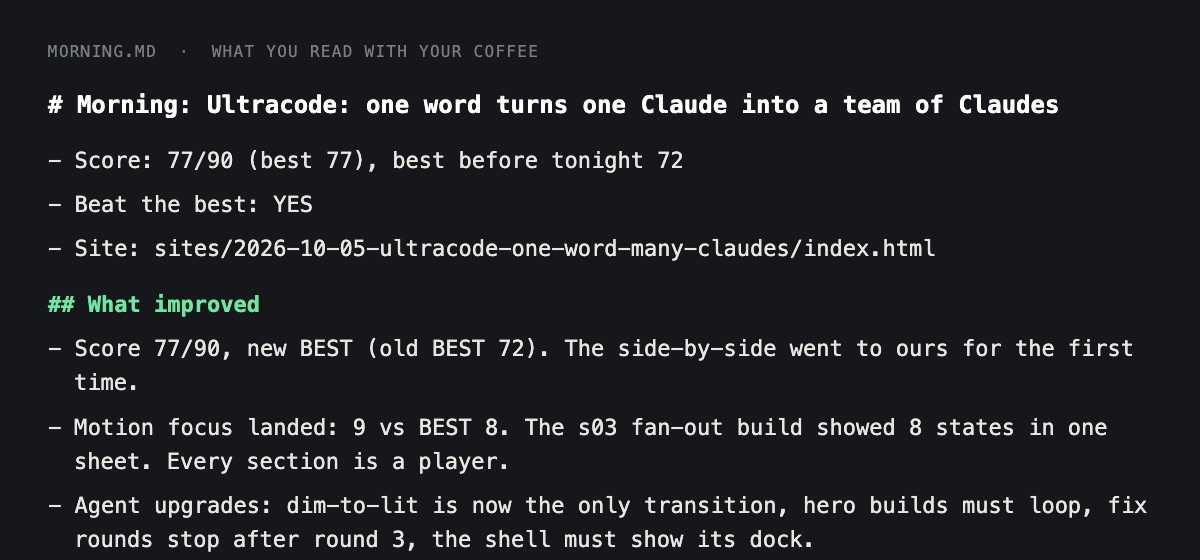
8. Morning report. If prompts/morning.md exists, follow it. Otherwise write MORNING.md in 3 lines: what improved, the score against the best so far, and the one file to open.
9. Stop. Never publish, post, send, email, deploy or push anything. Never edit an off-limits file (CLAUDE.md, AUDIENCE.md, settings.json, nightly.sh, the hard limits, benchmarks/), and change rule files only one cited line at a time.
END

When the test run ends, show me MORNING.md and the folder runs/[NIGHT]/.
What you should see: Claude works for 20 to 60 minutes. It will ask permission for file edits the first time; say yes. At the end you get a MORNING.md and a runs/ folder for today holding the plan, the work, critique.md and score.json. Open critique.md first. If a run stalls for more than 10 minutes with no new files, press Escape, tell Claude where it stopped and ask it to continue.
Prompt 5: Get a 3 line morning report
The morning report is what you read with your coffee. Three lines, no approvals asked. This prompt saves the instructions as prompts/morning.md and runs them on your latest night. The nightly job then uses the same file.
promptSave everything between the START and END lines below as prompts/morning.md in this folder, word for word. Then follow it now on the latest night in runs/.

START
Write MORNING.md, replacing what is in it. Read the last 3 lines of ledger.jsonl, the newest folder in runs/ (critique.md, score.json, the retro), and FEEDBACK.md. MORNING.md must be 3 lines at most, plain words a friend would use:
1. What improved tonight, in one sentence, with the score and the best score so far on the same scale. If nothing improved, say so and say why.
2. What changed in the rulebook or the notes (one phrase per change, with the file name). If one of my feedback notes was handled, say which.
3. The one thing to look at: the file path to open. If tonight's change looks like it hurt, add the git commit to revert.
Do not ask me to approve anything. Do not use em dashes. Then open the newest run folder in Finder with: open runs/[the newest folder name]
END
Prompt 6: Schedule it to run every night on your Mac
Do this only after Prompt 4 ran clean by hand. On a Mac, the scheduler is called launchd. You don't need to learn it. This prompt makes the run script, a settings file so the agent can't do anything outside its lane, and the schedule.
promptSet up the nightly schedule for the loop in this folder. Read CLAUDE.md and GUARDRAILS.md first. Do not turn the schedule on until I say go.

1. Create settings.json for headless runs. Use the current Claude Code settings format (check the Claude Code documentation if you are not sure of the exact keys). Allow Bash, Read, Write, Edit, Glob and Grep inside this folder. Deny editing CLAUDE.md, AUDIENCE.md, settings.json, nightly.sh and everything in benchmarks/. GUARDRAILS.md and RUBRIC.md stay editable, because the agent may change single cited lines in them; its hard limits live in CLAUDE.md, which is denied. Deny git push, rm -rf, and anything that posts, sends, emails or deploys. A headless run has nobody to approve a prompt, so anything not allowed simply fails.
2. Create nightly.sh: it changes into this folder, makes a logs/ folder, then runs claude -p "$(cat nightly-run.md)" --settings ./settings.json and appends all output to logs/nightly.log. macOS has no timeout command, so add a simple background watchdog that stops the run when it reaches the maximum minutes in GUARDRAILS.md. Make the script executable.
3. Create a launchd plist at ~/Library/LaunchAgents/ named com.myloop.nightly.plist. It runs nightly.sh at 1:00am every day, with RunAtLoad false, and writes launchd's output to logs/. Set a PATH in the plist that includes the folder where claude is installed (find it with: which claude), plus /usr/bin and /bin, and set HOME. Without a PATH, scheduled jobs often can't find claude.
4. Do not load the plist yet. First show me nightly.sh and the plist, and ask me to confirm.
5. After I say go: load it with launchctl bootstrap gui/$(id -u) ~/Library/LaunchAgents/com.myloop.nightly.plist, then confirm with launchctl list | grep myloop. Then show me how to run one test night right now (launchctl kickstart -k gui/$(id -u)/com.myloop.nightly) and how to turn the schedule off (launchctl bootout gui/$(id -u) ~/Library/LaunchAgents/com.myloop.nightly.plist).
6. Tell me, but do NOT run it, the one command that wakes my Mac for the job, because it needs my password: sudo pmset repeat wakeorpoweron MTWRFSU 00:55:00
What you should see: Claude shows you nightly.sh and the plist and waits. After you say go, launchctl list prints a line containing myloop, which means the schedule is on. The next morning, open MORNING.md. If it is not there, open logs/nightly.log to see what went wrong.
Mistakes that cost a night
- A kind critic. Fix: the side-by-side test with a cap at 5, and real benchmarks, not just your own work.
- The agent changes its judge without a reason. Fix: every rule change must cite a score or your note, and the morning report lists it so you can undo it.
- Polish instead of progress. My agent's own lesson: mechanism changes move the score, polish does not. After round 3, only fix what changes a score.
- Five changes in one night. Fix: one focus area per night, so you can tell what worked.
- A rulebook that grows forever. Fix: a line cap, replace instead of add, and a source on every line.
- Restyling when the idea was the problem. The ladder graphic won by getting clearer, not prettier.
- A job that never starts. Usually a missing PATH in the plist, or a sleeping Mac. Read logs/ first.
Your path from reading to a working loop
- 1Install Claude Code, make ~/my-loop and start Claude in it.
- 2Put your 3 to 5 best examples in the folder (files or links).
- 3Paste Prompt 1 and answer the interview. Read RUBRIC.md.
- 4Paste Prompt 2 to build the loop folder.
- 5Paste Prompt 3 to save the critic.
- 6Paste Prompt 4 and watch the first night run by hand.
- 7Paste Prompt 5 to get your morning report.
- 8Write one note under New in FEEDBACK.md, then tell Claude to follow nightly-run.md again and watch it handle the note.
- 9When two hand runs go clean, paste Prompt 6 to schedule it.
- 10Read MORNING.md each day. Keep the feedback doc open. That's your whole job now.
This guide gives you the map and the prompts. Inside Claude Code Club we build systems like this together: you post what you made, you get feedback, and you see how other members are using Claude Code to build their own.
If you build your own loop, come show me what it learns. Duncan
👉 https://www.skool.com/claudecodeclub
Common questions
Do I need to know how to code to build a self-improving agent?
No. You paste six prompts into Claude Code, and Claude writes every file. Your job is to say what good looks like and to read a three line report each morning.
What is a self-improving AI agent?
It's a Claude Code agent that runs on a schedule, makes one kind of thing, has the work scored by a critic against your best examples, and writes the lessons into a rulebook file that it reads the next night.
Will it post or send things without me?
No. The loop writes local files only. Posting, emailing, deploying and git push are blocked in the settings file, and you flip any switch yourself.
Does it run all day?
No. It wakes once a night, works for a set time limit and stops. Mine run between 30 and 120 minutes. Your Mac must be awake at the scheduled time.
How is this different from Karpathy's autoresearch?
Same loop: change something, test it, keep or throw away, repeat overnight. His score is a number a computer measures. Most creative work has no such number, so this version adds a critic with benchmarks and a rulebook the agent edits.
Keep going
Want to build systems like this with us?
Get 650+ plug-and-play skills, MCPs & prompts, plus 8,000+ members - $9/mo, cancel anytime.
Join the Club