
How Long Does It Take to Learn Claude Code?
You can plan on a few evenings to get Claude Code installed and finish a first small build, and that is a plan, not a promise, because how fast you go depends on how clearly you can describe what you want. There is no finish line to 'learn' it by, since the skill is describing a result, checking it and asking for a change, and you get sharper at that every time you do it.
If you work full time, the useful question is not how long it takes but how little time a week you need. This post gives you a first week of just over three hours in total, split into blocks small enough to fit around a job, with a finished result at the end of it.
What You're Probably Worried About
The people I hear from share the same few worries, and a week plan has to answer each one or you'll quit by Wednesday.
- "I don't have time to learn it on my own." So every block below has a time box and a stopping point. When the time is up, stop.
- "I work fulltime, have a family of 6..." So no block is longer than 40 minutes on a weekday, and the longest one, on the weekend, is about an hour.
- "Too many hype videos." So you won't watch any. Every block is you doing something and seeing it work.
- "I can't figure out the sequence of all the steps." So the order is written out for you, day by day.
- "I'm a creative not a coder or engineer." So nothing here asks you to write code. You describe what you want in plain English.
- Worry that it's one more course that goes nowhere: so the week ends with a finished thing you can open and show someone.
Those are real quotes from people who joined Claude Code Club, and I built the plan around them. The thing none of them needs is more theory. They need a short, ordered list of steps and a result.
What You Need Before Day 1
A paid Claude plan, a computer, and a project to build. The project is the part people skip, so here is mine: a one-page website about you or your business. It finishes in one sitting, you can judge it by looking at it, and it needs no extra accounts. What should I build first with Claude Code as a beginner? walks through that exact project step by step, and this plan spreads it across your week.
Pick the times now. A block you didn't schedule is a block that doesn't happen. Lunch break, the half hour after the kids are in bed, early morning before the house wakes up: any slot works as long as it's the same one each day.
Day 1: Get It Open and Say Hello (30 Minutes)
Goal: Claude Code is installed, you're signed in, and one tiny thing has worked. Follow Can I use Claude Code if I'm not a coder?, which covers the desktop app with no terminal and the one-line install for those who prefer it.
- Install Claude Code and sign in.
- Create an empty folder on your Desktop called first-site and open it in Claude Code.
- Type: make me a simple webpage that says hello world. Approve the file it creates and double-click it to open it in your browser.
- Stop. You're done for the day. A working hello world is a win.
If the install fights you, set a timer for 30 minutes and stop when it rings, even if it isn't fixed. claude: command not found: how do I fix it? covers the most common error, and an unfinished install is a Day 2 problem, not a reason to give up.
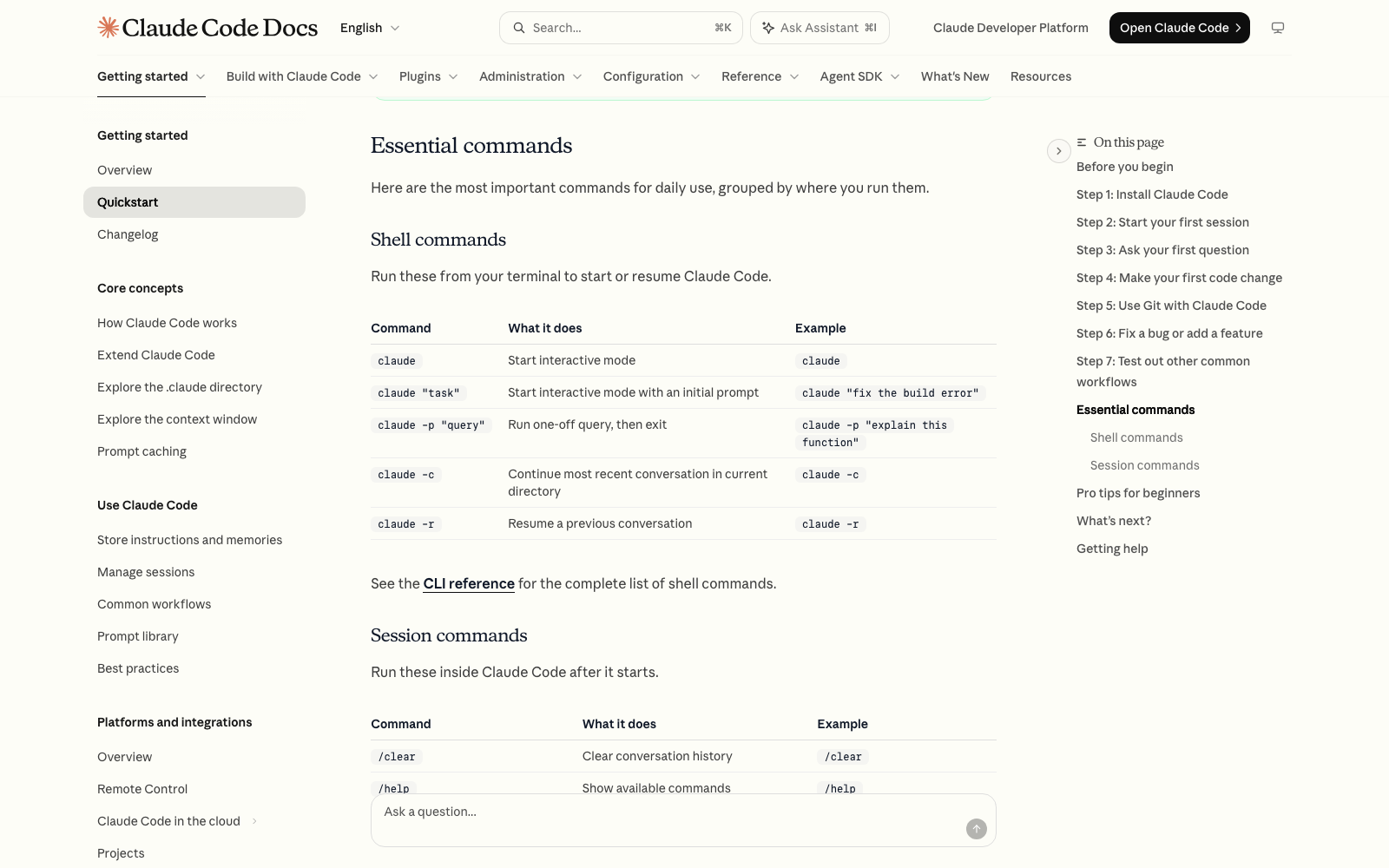
Day 2: Let It Interview You (30 Minutes)
Goal: a SPEC.md file, which is a short written description of the page you're about to build. Anthropic's best practices page recommends this move when you don't know exactly what you want: ask Claude to interview you until it could write the spec, then write it to a file.
- Open your first-site folder in Claude Code. If you closed the window, type claude -c to pick up the most recent conversation in that folder, or /resume to choose an earlier one.
- Type: I want a one-page website for [you or your business]. I haven't thought it through yet. Interview me until you could write the spec, then write it to SPEC.md.
- Answer the questions in plain words. Skip any you can't answer and ask what it would pick.
- Read SPEC.md. Fix anything wrong by telling Claude Code what to change.
Day 3: Build the Page (40 Minutes)
Goal: your page, open in your browser. This is the longest weekday block because the build itself can take a few minutes while you wait and review.
- Open the folder in Claude Code and type /clear so the build starts from a clean slate. Your SPEC.md file stays in the folder.
- Type: Read SPEC.md and build the one-page website it describes as a single index.html file I can open in my browser. Be ambitious: make it look polished, make it work on a phone, and write real copy instead of placeholder text.
- Approve the files it creates, open index.html in your browser, and look at it.
- Ask: go through SPEC.md item by item and tell me where each one is on the page, and flag anything you left out.
Claude stops when the work looks done, and the docs recommend asking for evidence instead of taking 'it's done' at face value. The last step in that list is that habit.
Day 4: Learn the Three Controls (20 Minutes)
Goal: you know how to stop Claude Code, undo it, and start over. These are the habits that stop beginners from quitting after one bad result, so spend a day on them.
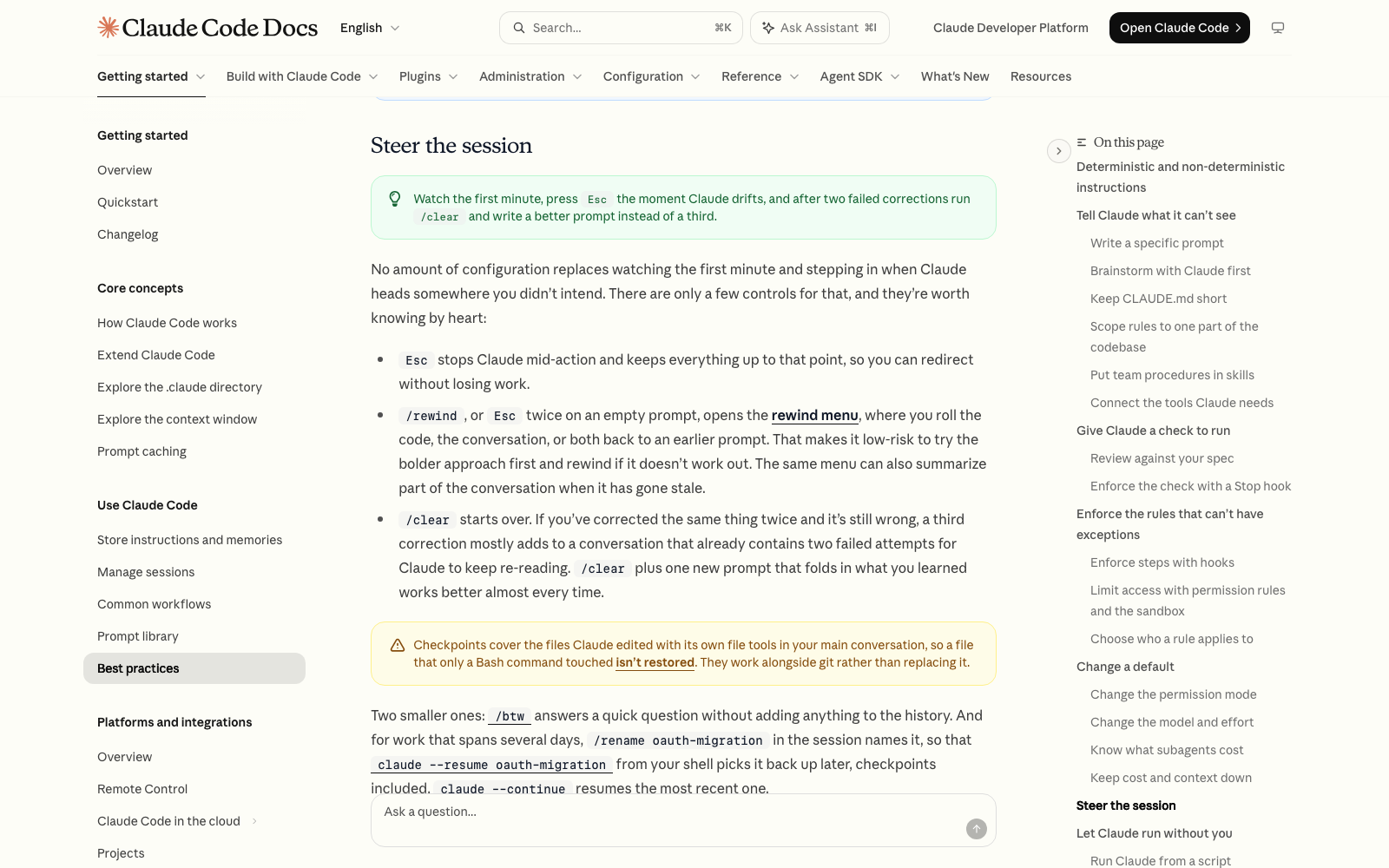
- Ask for one change to your page, like make the headline shorter. While Claude Code is working, press Esc to stop it. It keeps everything it did up to that point.
- Ask for a second, bolder change, like use a completely different color scheme. Look at the result.
- Type /rewind (or press Esc twice on an empty prompt) and roll back to before the bold change. It's a menu, and you can roll back the files, the conversation, or both.
- Ask for something, then correct it twice. If it still isn't right, type /clear and write one new request that includes what you've learned. Anthropic's advice is that this beats a third correction.
Day 5: Teach It About You (20 Minutes)
Goal: a CLAUDE.md file, so you stop repeating yourself. Each Claude Code session starts with a fresh context window, which means it doesn't remember your last conversation on its own. A CLAUDE.md file is a plain text file of instructions that Claude Code loads at the start of every session, so it's how you carry things over.
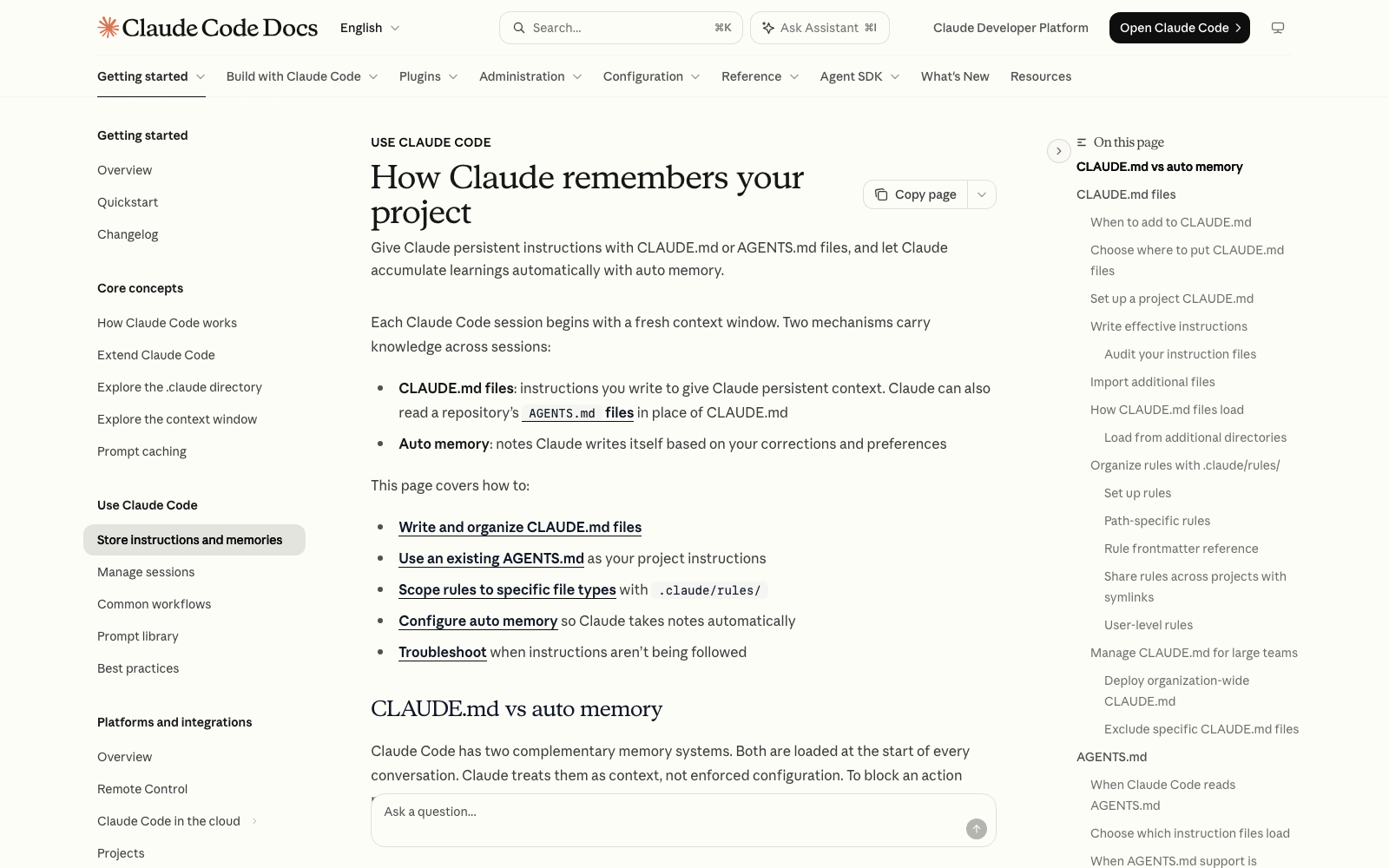
- Open your folder in Claude Code and ask it to interview you, one question at a time, about who the website is for and the tone you want, then write the CLAUDE.md from your answers. For what belongs in the file, see What should I put in CLAUDE.md, and how do I organize it?.
- Add three lines yourself, in plain English: who the website is for, the tone you want, and anything Claude Code got wrong on Day 3 that you don't want repeated.
- Type /clear, then ask for a small change. Check that Claude Code followed the file.
One thing to know: CLAUDE.md is a set of instructions Claude reads, not a lock. The docs say Claude treats it as context, not enforced configuration. Keep it short, since every line takes a little of Claude's attention on every task. Anthropic's rule of thumb is to write down only what Claude couldn't work out on its own.
Weekend: Finish It and Show Someone (60 Minutes)
Goal: the page is good enough that you'd show it to a friend. Use the hour to make five changes you actually care about: your real photo, your real wording, the contact details, a section you left out, a color you like better. One change per message, checking the page after each.
Then show it to one person and ask what's unclear. That feedback is the first real test of your page, and it's the moment this stops being practice. One member of my cohort turned the questions I asked about his copy into a reusable 'copy audit skill' in week one, ran it on his homepage, and found ten more gaps.
What 'Learned' Looks Like After Week One
Not expert. Competent at the loop: you can open Claude Code, describe a result, check it against what you asked for, stop it, undo it, and carry instructions into the next session. That's the foundation, and I'd rather you have a small thing you finished than a long list of features you've heard about.
What to expect from each stage, as a plan rather than a guarantee
| Stage | What you can do | What it takes |
|---|---|---|
| Week one | Install it, build and fix a one-page site, use Esc, /rewind and /clear, write a short CLAUDE.md | About three hours, in blocks |
| Weeks two to four | Build a second thing without a step-by-step guide, and reuse your CLAUDE.md | A couple of short blocks a week |
| After that | Add skills, connect other tools, build for other people | Ongoing, as you need them |
I've never written a line of code by hand in my life. What I learned instead was how to communicate what I want, iterate on it, and refine it one pass at a time, and none of that has a graduation date.
Common Problems
- You missed a day: skip it, don't double up. Pick the plan back up at the next block. A week with four blocks is still a week.
- A block ran over: stop when the time box ends, even mid-step. Claude Code remembers nothing between sessions on its own, so write one line in your notes app about where you stopped, and use claude -c next time to continue the most recent conversation in that folder.
- The result looks nothing like you pictured: that usually means the request was too vague. Open SPEC.md, add specifics, and rebuild.
- You feel behind: you're comparing your day 2 to someone's edited demo. See Why does the Claude Code demo work for them but not for me?
Where to Go Next
After week one, the best next step is a second project that's different from the first, and What should I build first with Claude Code as a beginner? is the place to double check your first one. If you'd rather follow a longer path with other people doing it alongside you, Claude Code Club is $9/month, and that's where I walk members through their builds.
Short, practical drops on skills, MCP, agents, prompts, and more. No spam, unsubscribe anytime.
Frequently asked questions
How long does it take to learn Claude Code if I work full time?
Plan on just over three hours spread across your first week, in blocks of 20 to 40 minutes, to get it installed and finish a first small build. After that you improve by using it. Nobody can give you a fixed number of weeks to 'know' Claude Code, because the main skill, describing a result clearly and checking it, keeps improving with use.
Can I learn Claude Code in a weekend?
You can install it and finish a small first project in a weekend, and the plan in this post fits into two or three sittings if you prefer that to weekday blocks. What you can't do in a weekend is get the repetition that makes the habits automatic, so plan a few short sessions the following week too.
Do I need to know how to code before I start?
No. You describe what you want in plain English and Claude Code writes the files, and Anthropic's own terminal guide for beginners says you don't need to know how to code. Your job is to be clear about the result you want, check what it builds, and ask for changes.
Does Claude Code remember what I did last time?
Not by itself. Anthropic's docs say each session begins with a fresh context window. Two things carry knowledge across sessions: a CLAUDE.md file with instructions you write, and auto memory, which are notes Claude writes itself. You can also continue your most recent conversation in a folder by typing claude -c, or pick an earlier one with /resume.
Last reviewed by Duncan Rogoff on November 9, 2026