
Which MCP Servers Are Worth Installing?
For most people, the first picks are the ones for the apps you already use every day: Notion for notes and docs, GitHub if you keep code or files there, and Playwright, which gives Claude a web browser it can drive. Each takes one command to add, and every one in this post appears in Anthropic's own documentation.
MCP stands for Model Context Protocol, an open standard for connecting AI tools to other software. Anthropic's docs put the reason to add one simply: connect a server when you keep copying information into the chat from another tool. Once connected, Claude reads and acts in that tool directly.
What Too Many Servers Cost You
Everything Claude can see in a conversation sits in its context window, its working memory for the session. Each connected server uses some of it, because Claude needs to know the server's tools exist. Anthropic's docs describe how Claude Code keeps that small: tool search is on by default, so only each tool's name and the server's instructions load at the start of a session, and the full details load only when Claude needs a tool. The docs say adding more servers has minimal impact on the context window this way.
- That behavior applies to Claude Opus 4, Sonnet 4, Haiku 4.5 and later models. On earlier models, Claude Code loads every tool upfront.
- The docs still note that each connected server takes some space in the context window, and recommend removing servers you no longer use.
- Run /context inside Claude Code to see what is using space, and /mcp to see your servers and turn off the ones you are not using.
- A single tool result that comes back huge costs real space. Claude Code shows a warning when a server's tool output passes 10,000 tokens (tokens are the small chunks of text Claude reads) and caps output at 25,000 tokens by default.
- For some tools there is a lighter option. Anthropic's cost guide says command-line tools such as gh (GitHub's), aws, gcloud and sentry-cli are still more context-efficient than their MCP servers, because they add no per-tool listing.
A simple rule: add a server when you have a task for it this week, and remove it when you stop. That keeps the list short and the setup easy to reason about.
How to Add an MCP Server
You add servers with a command you type in your terminal (not inside a Claude Code session). The commands are the same on Mac and Windows in Anthropic's docs, except for the cmd /c wrapper on native Windows shown for Playwright below. There are three common shapes, and the only difference is what follows claude mcp add.
- A hosted server with a web address: claude mcp add --transport http <name> <url>. The name is anything you like. Anthropic calls this the recommended option for remote servers.
- A hosted server that needs you to sign in: add it the same way, then start Claude Code, type /mcp, choose the server, and choose Authenticate. Your browser opens so you can approve it.
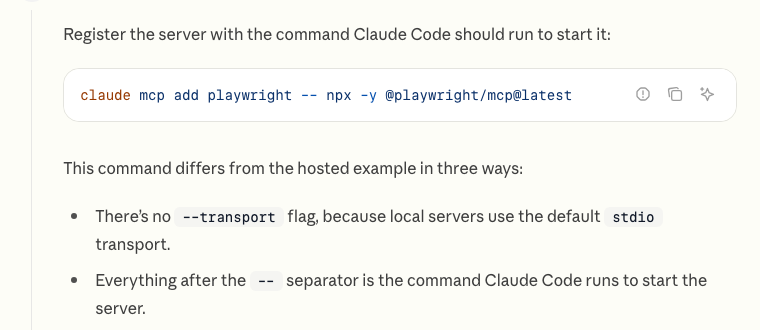
- A program that runs on your computer: claude mcp add <name> -- npx -y <package>. The -- (double dash) separates Claude's options from the command that starts the server.
Here is the full cycle with the docs server, which needs no account. Start in any folder:
- claude mcp add --transport http claude-code-docs https://code.claude.com/docs/mcp
- claude mcp get claude-code-docs
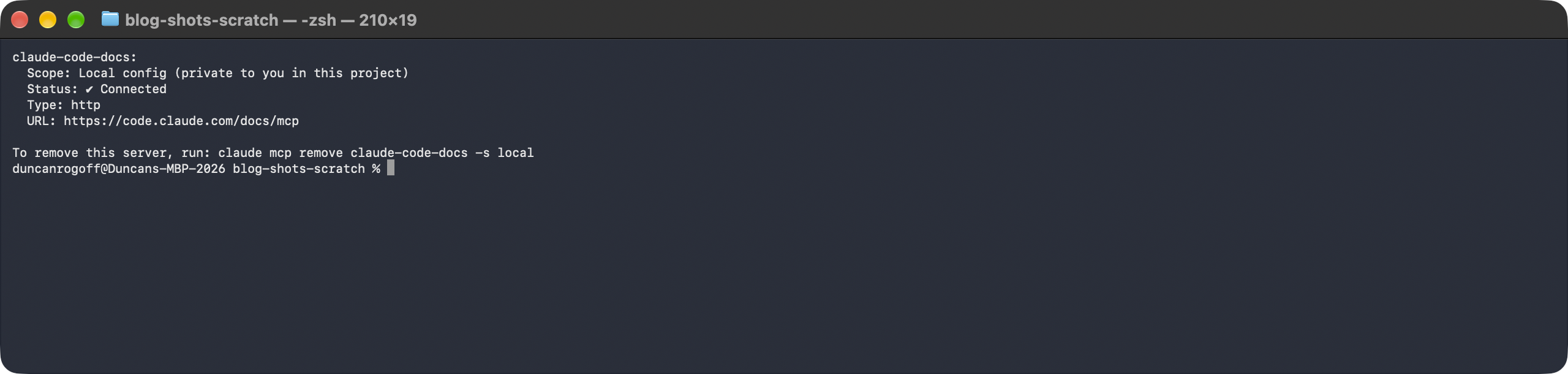
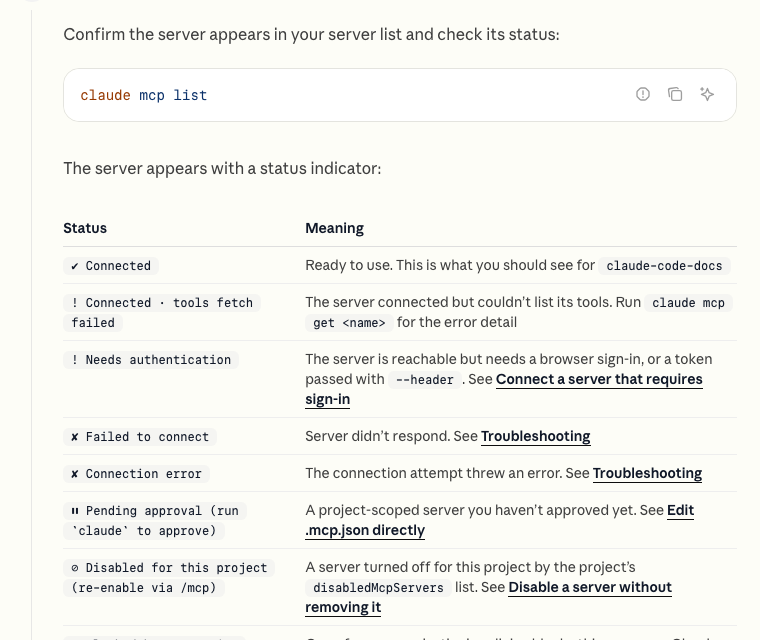
The get command shows the status of that server (claude mcp list shows the status of every server you have):
Then start Claude Code with claude and ask it to use the server by name, for example: Use the claude-code-docs server to look up what MCP_TIMEOUT does. Claude's tool calls are labeled with the server name, which is how you know the answer came from the server. Remove it later with claude mcp remove claude-code-docs.
Where a server is saved depends on the scope you choose
| Scope | Where it loads | Shared with your team | How to pick it |
|---|---|---|---|
| Local (the default) | Only the project you added it in | No | No flag needed |
| Project | Only that project | Yes, through a .mcp.json file | --scope project |
| User | All your projects | No | --scope user |
The Servers Worth Installing
Each one below is shown in Anthropic's MCP docs or quickstart with the command given. Run it in your terminal, then run claude mcp list to check it.
1. The Claude Code docs server. It lets Claude search Anthropic's own Claude Code documentation, so answers about Claude Code come from the source instead of memory. No account needed:
- claude mcp add --transport http claude-code-docs https://code.claude.com/docs/mcp
2. Notion. Lets Claude work with your Notion pages. Anthropic's docs list it as the example for adding a hosted server. It sits behind a sign-in, so after adding it, run /mcp inside Claude Code and choose Authenticate:
- claude mcp add --transport http notion https://mcp.notion.com/mcp
3. Playwright. Gives Claude a web browser it can open, click and read, which is useful for checking that a page you built still looks right. It runs on your computer through npx, so you need Node.js 18 or newer. No account is needed. The first check can show Failed to connect while the package downloads, so wait a moment and run claude mcp list again:
- claude mcp add playwright -- npx -y @playwright/mcp@latest
On native Windows (not WSL), put cmd /c before npx: claude mcp add playwright -- cmd /c npx -y @playwright/mcp@latest. If it errors, check Anthropic's MCP docs page.
4. GitHub. Lets Claude review pull requests, open issues and list what is assigned to you. GitHub's server uses a personal access token instead of a sign-in screen. Create a fine-grained token in your GitHub token settings with access only to the repositories you want Claude to touch, then add the server, replacing YOUR_GITHUB_PAT with the token:
- claude mcp add --transport http github https://api.githubcopilot.com/mcp/ --header "Authorization: Bearer YOUR_GITHUB_PAT"
5. Stripe. Anthropic's docs use Stripe's hosted server to show how a server is added: claude mcp add --transport http stripe https://mcp.stripe.com. Run /mcp after adding it to see whether it is connected or needs authentication.
Also named in Anthropic's docs: Sentry (claude mcp add --transport http sentry https://mcp.sentry.dev/mcp, for error monitoring), HubSpot (claude mcp add --transport http hubspot --scope user https://mcp.hubspot.com/anthropic), Asana (an older style, claude mcp add --transport sse asana https://mcp.asana.com/sse), Airtable, and a PostgreSQL server called DBHub that Anthropic suggests pointing at a read-only database login so Claude's queries cannot change your data.
Where to Find More Servers
Anthropic keeps a reviewed list called the Anthropic Directory at claude.ai/directory, and any remote server listed there can be added with the same claude mcp add command. Two no-terminal routes also exist. In the desktop app, click the + next to the prompt box and choose Add connectors, which opens a directory with a point-and-click setup. In VS Code, type /mcp in the chat panel to add and manage servers. If you add connectors in your Claude account on claude.ai, Claude Code loads them automatically when you sign in with that same account.
Common Problems
- /mcp says 'No MCP servers configured': you probably added the server from a different folder. A local-scope server is tied to the project where you added it. Add it again from your current folder, or add it with --scope user so it works everywhere.
- The status says Failed to connect: for a Playwright-style server, wait for the download to finish and run claude mcp list again. If it still fails after a couple of tries, check the web address or the command for typos.
- The status says Needs authentication: run /mcp, choose the server, and choose Authenticate. If you passed a token with --header, check that the token is valid.
- On Windows, the older console that comes with Windows 10 can show a check and an X as √ and ×. They mean the same thing.
- You edited a settings file and nothing changed: Claude Code reads servers from ~/.claude.json and from a .mcp.json file in your project folder, not from other paths.
Where to Go Next
MCP is one of four ways to extend Claude Code. What is the difference between skills, MCP, subagents and hooks? shows which to reach for. If you are worried about what a connected tool can do on your behalf, read Is Claude Code safe? Can it delete my files?. Claude Code Club is $9/month if you want setups like these walked through.
Short, practical drops on skills, MCP, agents, prompts, and more. No spam, unsubscribe anytime.
Frequently asked questions
What is an MCP server in Claude Code?
An MCP server is a connection that lets Claude Code read and act inside another tool, such as Notion, GitHub or a database. MCP stands for Model Context Protocol, an open standard. You add a server with claude mcp add, and Claude then uses its tools when a task needs them.
What is the command to add an MCP server?
For a hosted server, run claude mcp add --transport http <name> <url> in your terminal. For a program that runs on your computer, run claude mcp add <name> -- <command>, for example claude mcp add playwright -- npx -y @playwright/mcp@latest. Then run claude mcp list to check the status.
Do MCP servers use up my usage or context?
They use some context. Anthropic's docs say tool definitions are deferred by default, so only tool names and server instructions load at the start of a session, and adding servers has minimal impact. Each connected server still takes some space, and Anthropic suggests disabling servers you are not using. Run /context to see what is taking space.
How many MCP servers can I install?
Anthropic's docs say Claude Code does not set a fixed limit on tools per server, and that the practical limit is your context window. A short list you actually use is easier to manage than a long one.
Where are my MCP servers saved?
By default (local scope), in your user settings file ~/.claude.json, tied to the project you added them from. Project-scope servers are saved in a .mcp.json file in the project folder so a team can share them. User-scope servers, added with --scope user, work in all your projects.
Last reviewed by Duncan Rogoff on November 9, 2026