
Seven Moves From Chatting With Claude to Real Work in Claude Code
TL;DR
Chat answers questions. Claude Code does the work, and it does it well when you brief it like a new hire. Seven moves get you there: work in Claude Code, pick the right kind of instruction, keep one small file per fact about you, plan before building, brief with a goal prompt, bottle repeat jobs into skills, and refine in rounds. Start with the memory files, because everything else gets better once Claude knows who it is working for.
The full guide is right here on this page. The download is the same guide as a single file you can keep and open offline.
Download the guideIf you only chat with Claude, you are using a tiny fraction of it. The people who get work back that they put their name on are doing a handful of things differently from the people who get generic answers and spend the afternoon fixing them. I have never written a line of code by hand, and I do most of my work in Claude Code today. This guide walks through the moves that got me from chatting to doing my real work with it.
Work in Claude Code, not the chat window
Chat is great for asking a question and getting an answer, and that is where it stops. Claude Code can do everything chat can do and a lot more: it makes the files, builds the website, writes the post and puts it where it needs to go.
If you have the Claude desktop app, it is already there. Click the Code tab at the top and you are in Claude Code. The word code scares people off, but using it does not mean you are coding and you do not need to know how. You talk to it the way you would talk to a new hire.
That comparison matters for the rest of the guide. A new hire is capable, but it does not know your business, your taste or your way of doing things. It works far better when you give it clear instructions, and every move below is a way of giving clearer instructions.
Decide which kind of instruction you are giving
There are two kinds of instruction you can hand Claude Code, and mixing them up is the first reason people get generic results.
- An SOP, a standard operating procedure. Use it when the outcome or the path is specific. Say someone fills out the contact form on your website: you take their details, add them to your CRM (the place you keep your customer list), then send one email if their answers to a few qualifying questions say they fit and a different email if they do not. For me, SOPs have largely replaced no-code automation.
- An end goal. You say where you want to end up and Claude works toward it using its own knowledge. Most people only ever give this kind, and usually in a single sentence.
The decision is simple. If you have a way you like the job done, spell out the steps. If you do not, give a really clear goal. The tell that you picked wrong is easy to spot: a one-sentence goal that comes back generic needed either a better goal or, if you secretly had a method in mind, the steps.
Give Claude a knows-me card made of small files
Before any task, Claude needs to know who it is working for. The complaint I hear most is that Claude does not know the person, their tone of voice or how they like to write, so they re-explain themselves in every session. The cause is usually that they packed too much into one file.
Claude Code reads a file called CLAUDE.md at the start of every session. The md stands for markdown, which is basically a plain text file. CLAUDE.md is only the start. What helps a lot is a handful of other markdown files that each cover one part of you: your tone of voice, your brand guidelines for visuals, who your audience is and the language they use, your core offer, and your personal story.
Then you strip CLAUDE.md way down and use it as an index, a map of where everything else lives. When Claude writes something in your name, it opens your voice file. When it designs something, it opens the design file. When a task needs neither, it leaves them alone.
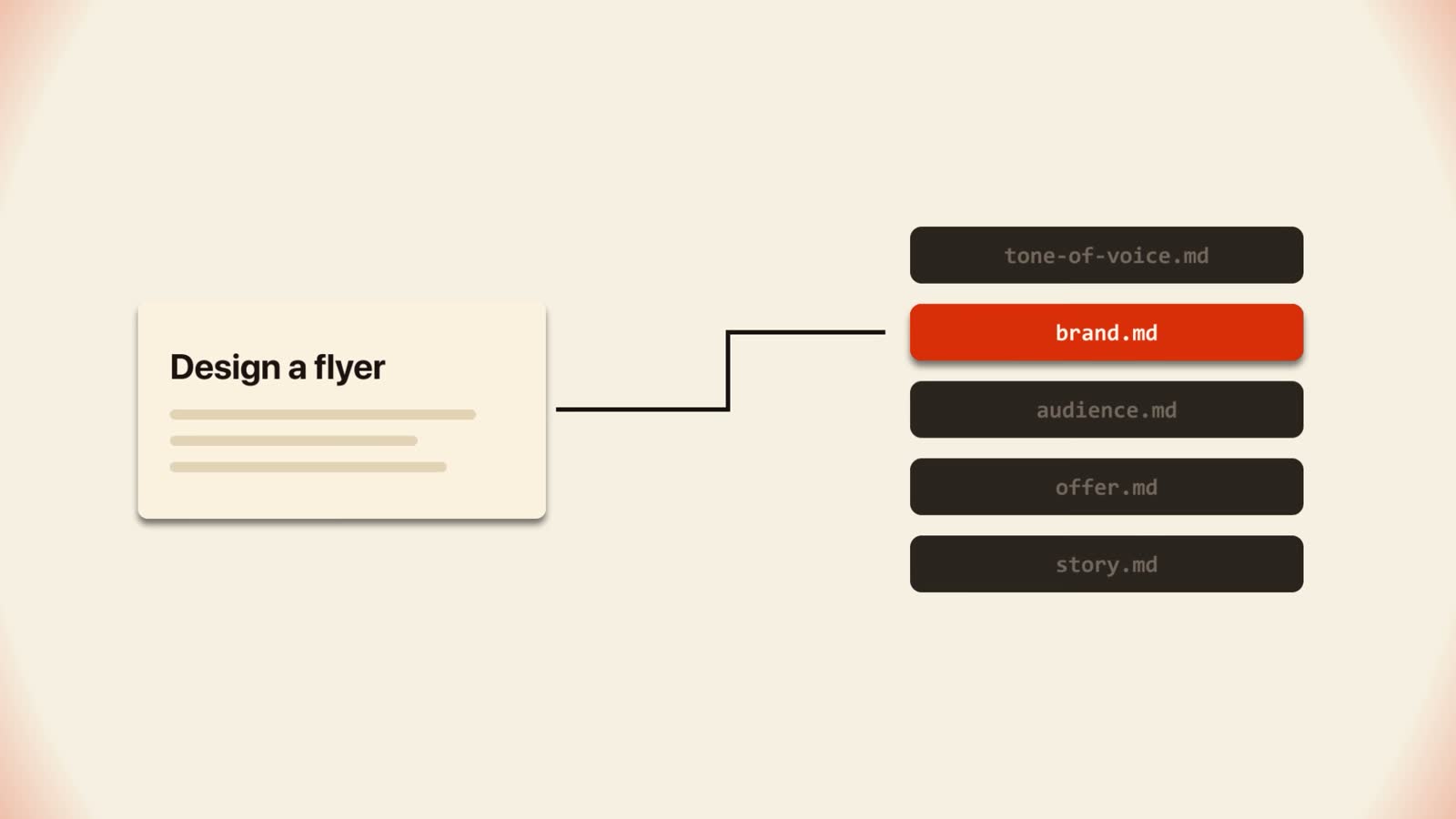
The point is that Claude reads the right information when it needs it and nothing more. Extra context it does not need is bloat, and bloat is what leads to drifting and making things up. Mine has a section on where my notes live, one on my voice, one on my design styles, a list of files to read only when needed, and a note on how I communicate. I use voice to text, so it knows to read for what I mean.
Keep every fact in one place and point to it
This is the idea that generalizes furthest. The most important rule in my whole setup is that notes point to facts and never copy them.
Here is why. If the same fact lives in five different notes, sooner or later one of them goes out of date. Claude then reads the stale one and goes with the wrong fact, and it is totally confident about it.
So the working rule is one home per fact. Your offer details live in the offer file. Your voice rules live in the voice file. Everywhere else, a note says where to look instead of repeating the content. When something changes, you edit one file and every future session is right.
I call the finished set your Claude knows me card. Once it exists, the quality of what comes back changes. People start posting more often, their websites reflect them better, and they can run things on repeat knowing the result will be consistent and on brand, without re-explaining anything.
Make Claude plan before it builds
Claude Code has a feature called plan mode. You turn it on and, instead of jumping in, Claude lays out what it is going to do and waits for you to approve. I use it for any task with three or more steps.
Boris Cherny, who created Claude Code, has said you do not really need plan mode anymore, because the models are good enough to make a plan on their own or you can simply ask for one. He is right about Claude. I still find plan mode helpful if you are new, because it shows you the plan of attack before anything gets built. Plan mode is really for the human, not for Claude. If you would rather skip it, type make a plan first and you get most of the same benefit.
The failure it prevents is trying to build the whole thing in one shot and then wondering why it does not work. Plan first, break the work into smaller sections, and the results get much better. You also save tokens, since you are not re-checking a whole system on every message.
My example: we built a performance marketing platform for a big financial company, with loads of moving pieces, stakeholders and departments. Planning first let us see the whole product before building and work out how to build it one piece at a time. Without that plan we would have ended up with separate parts that did not fit together and a lot of bloated, repetitive code. A plan takes 10 to 20 minutes to make and refine. Building without one can take hours or days.
Brief it with a goal prompt that gets out of the way
Two things go wrong at this step. People hand Claude a task that is too big and are unhappy with the result, or they expect one prompt to deliver exactly what they pictured. A goal prompt fixes both. Every one I write has seven parts, and the whole idea behind them is to get out of the model's way.
- 1What you want and why it matters. The real thing you need, with the real number.
- 2The quality bar. What excellent looks like, described in vivid words.
- 3The tools. Name the tools that already exist, then tell Claude to go find more.
- 4Creative freedom. Claude is allowed to change the plan and make the choices.
- 5Checking its work. It goes back over what it made at least three times.
- 6Delivery. Where the finished thing goes and what link or file comes back to you.
- 7The goal, restated. One sentence that says the goal again and tells Claude to work completely autonomously and not ask you for anything until it is all done.
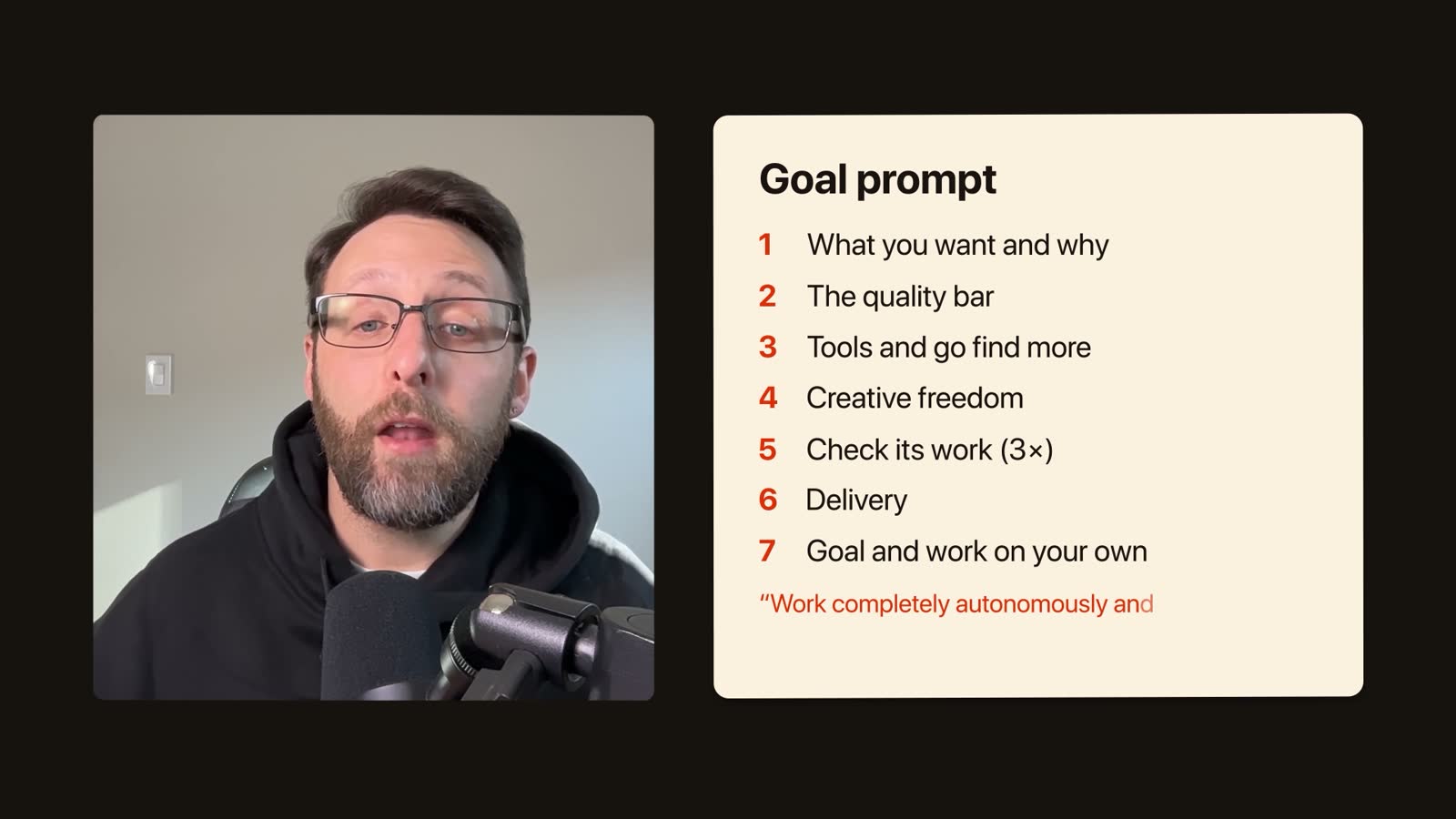
You do not have to write all seven yourself. I built the process into a skill. You ramble to Claude for 5, 10 or 15 minutes about what you have, where you want to go and any ideas you have, and Claude organizes it into the seven parts. The goal skill is free, and the link is further down this page.
Worked example: the same milk website, briefed two ways
To show the difference, I did the same job twice with the same Claude. The only thing I changed was how I briefed it.
- Way one, the way most people do it. One sentence: make me a website all about the wonders of milk. What comes back works, but it is pretty generic.
- Way two. I rambled to Claude about what I actually wanted and gave it a beautiful reference with the words this is what I want it to look like. The goal skill turned that into a full goal prompt, and I ran that.
Side by side, that is the difference. Notice what the second brief contained: the real situation, a picture of what good looks like, permission to go look for new ideas and tools, and room to make its own choices. None of it was technical.
Bottle any weekly job into a skill
Once a job finally comes out right, you never want to work it out from scratch again, so you bottle it into a skill. Think of a job you do every week the same way: a weekly update, turning notes into a post, checking a page before it goes live. If you would explain it to someone new the same way every time, it should be a skill.
Claude writes the skill for you. It comes with a skill called skill creator that handles the folder, the file and the wording at the top. You are not learning to write a skill. You are learning to describe a job well enough that somebody else could do it.
Pick your route: describe it up front or save it afterward
There are two ways to make a skill, and the second one is better.
The first route is to describe the job up front. You tell Claude three things. First, what the job is and when you would want it done. That when part goes at the top of the skill and is how Claude knows to use it at the right moment. A lot of people skip it, and then the skill works fine but Claude never uses it because it does not know when to. Second, how you actually do the job, in your order, including the step you always forget and have to go back for. That forgotten step often ends up as the most important line in the skill. Third, what the finished thing should look like.
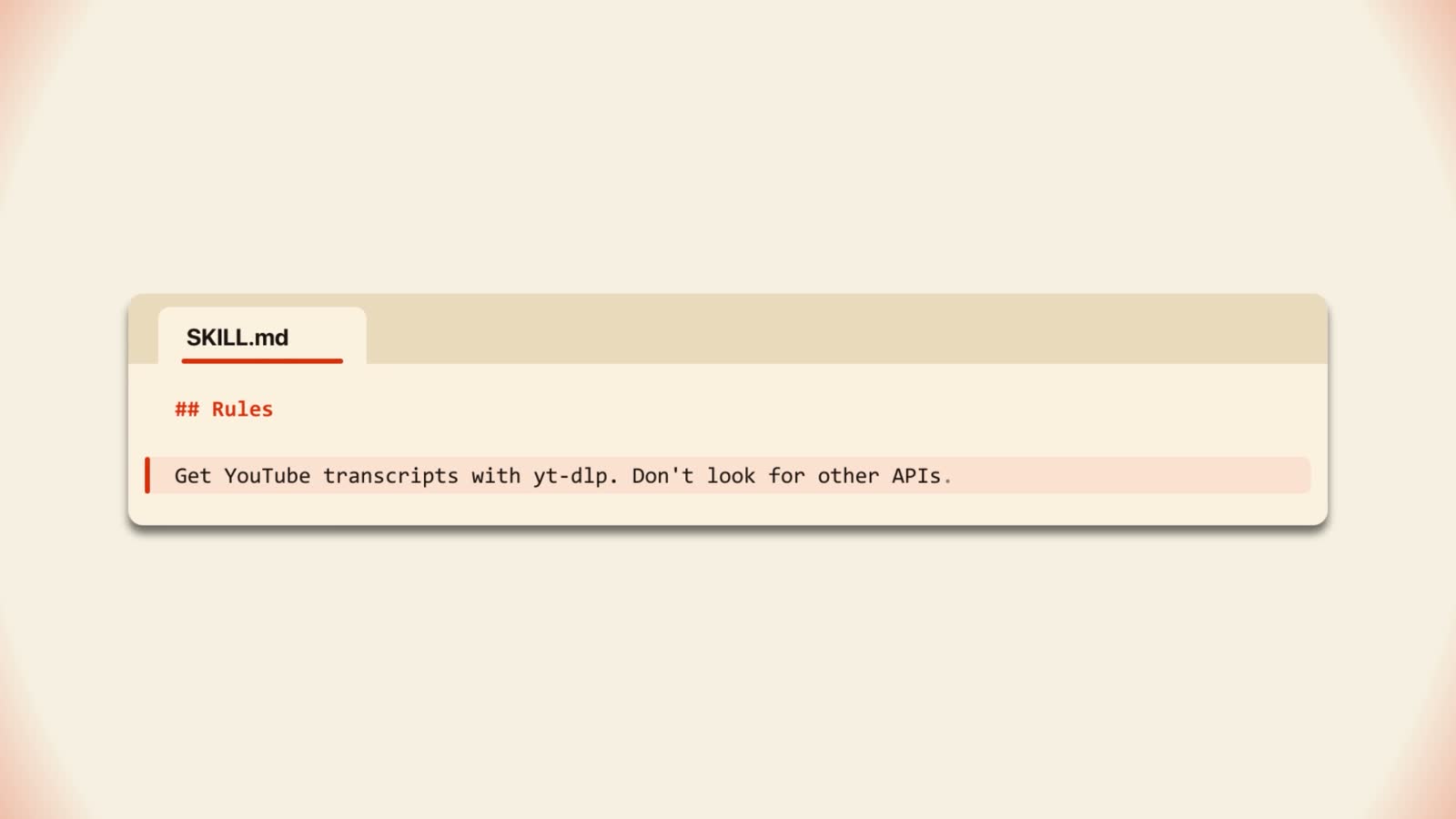
My example of a forgotten step is grabbing a transcript from YouTube. Left alone, Claude hunts through odd routes, APIs and third-party tools. There is a free tool called yt-dlp that grabs transcripts and is pretty reliable. One line in the skill telling it to use yt-dlp sends it straight there, and it works the first time with no tokens spent guessing.
The second route is to save it after it worked. Say you spent an hour with Claude getting something right. Do not close the chat. Tell Claude to turn what you just did into a skill. I like this one better because you already know the process works, and Claude watched you do it and fix it, so you do not have to remember every step. Most of us are bad at that.
Two practical things. A skill must be a folder with a file called SKILL.md inside, and a loose file on its own will not be read. And after you make a new skill, start a new session or restart the app. Then type a slash and your skill sits in the list with the others, as your own command.
To show how far this goes, I have a content engine skill. For every YouTube video I make, it creates a post and an image for LinkedIn, wires up my LeadShark automation so people who respond get my free guide by direct message, builds a guide on the Claude Code Club website and publishes to a couple of other places. That is an hour or two of work. Now I type one slash command and it runs in the background in about 10 minutes without me touching it.
Refine in rounds, one piece at a time
The last move keeps every other move getting better. People often do not know what they are looking for until they see it, so the goal is a basic first version that you then improve with feedback, the way you would with a person.
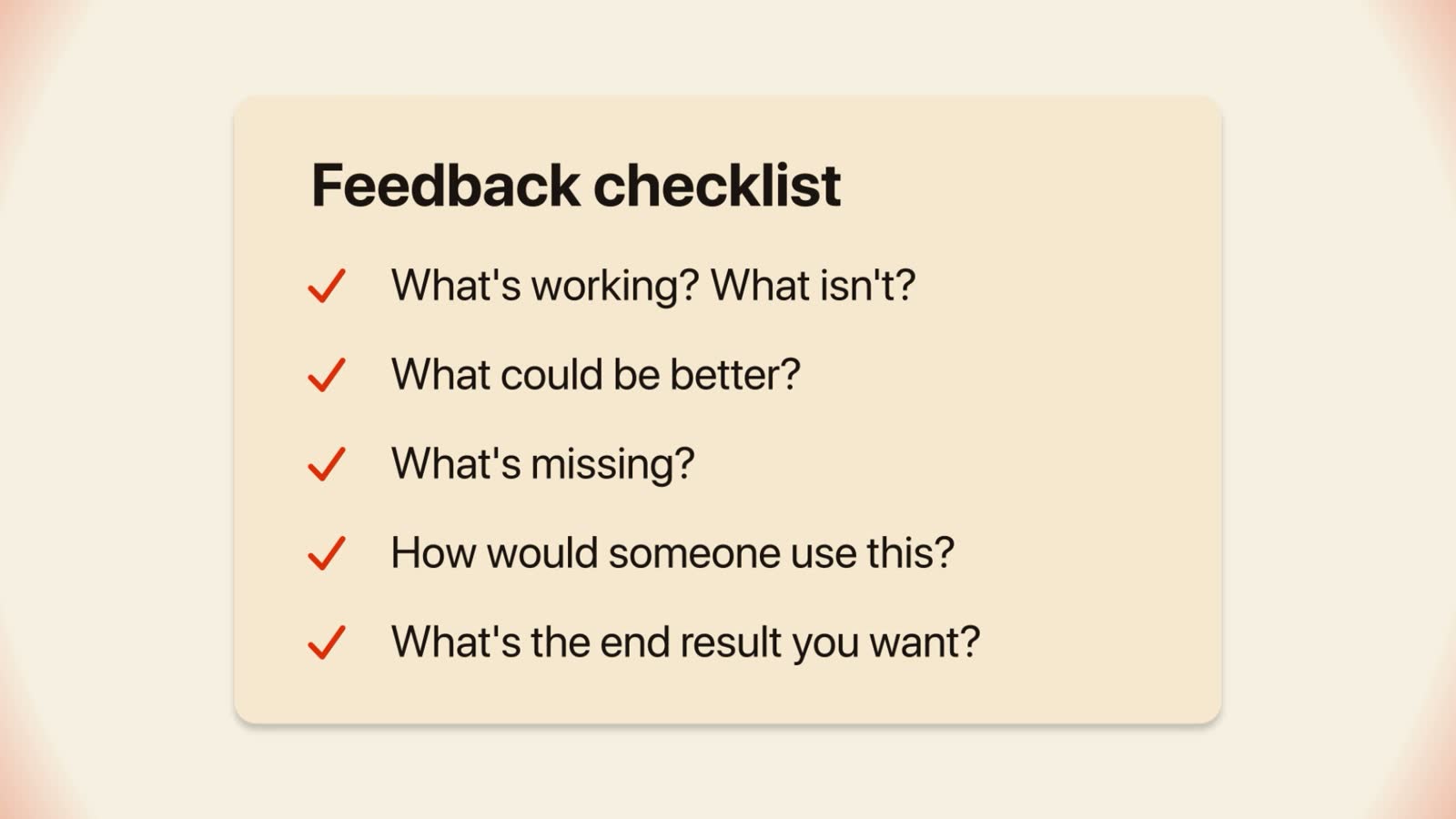
Use that checklist on every first version: what is working and what is not, what could be better, what is missing, how someone would actually use it, and what end result you really want.
Video editing is a good case, because everyone wants Claude to edit their video in one prompt, with motion graphics, sound effects and the mistakes cut out. Claude does not know what a mistake is or what design you want, so they end up with something low quality or generic. What I tell them is to define what good looks like and give Claude references of a finished, polished product. Then break the job into smaller steps and work on one piece at a time: get the script really good, then the design, then the storyboard, then the animation from the storyboard.
Every time you figure something out along the way, update the skill with it, so the next run already knows. I did creative work for big brands for 15 years, and good creative work has always been made this way: a clear brief, a look at the first version, notes, and go again. With Claude, every one of those notes can go back into the skill, so you only give it once.
Know what goes wrong and how to spot it
Almost every disappointing result traces back to one of these.
- You re-explain yourself every session. You have one giant CLAUDE.md or none at all. Split it into one file per topic and make CLAUDE.md an index.
- Claude confidently uses the wrong fact. The same fact lives in more than one note and one copy went stale. Keep each fact in one place and point to it.
- The whole build fails in one shot. You skipped the plan. Ask for a plan first and build in sections.
- The result is generic. Your brief was one sentence. Ramble the real context and a picture of good into a goal prompt instead.
- A skill exists but never fires. You left out when the job should be done, or you made a loose file instead of a folder with a SKILL.md inside. Fix the top of the skill, check the folder, and start a new session.
- Claude wastes time on the wrong route. The step you always forget never made it into the skill. Add that one line.
Follow this path from reading to doing
Here is the shortest honest route from finishing this page to having a real result in a single sitting.
- 1Open the Claude desktop app and click the Code tab at the top.
- 2Write down one job you do every week the same way. This is your first skill.
- 3Split what Claude should know about you into small files: tone of voice, brand and visuals, audience, offer, story. One fact, one home.
- 4Cut CLAUDE.md down to a map that says where each file lives and when to read it.
- 5Download the free goal skill, ramble to it for a few minutes about your job and what good looks like, and let it produce your first goal prompt.
- 6Turn on plan mode, or type make a plan first, and approve the plan before anything gets built.
- 7When the result comes out right, tell Claude to turn what you just did into a skill, then restart the app so it shows up when you type a slash.
- 8Run the feedback checklist on the next version and put every note you gave back into the skill.
When you have these running, what you can do with your time changes. AI gave me a choice between the things I could do, which included agency clients, building SaaS and selling digital products, and I now choose to make content and build a community. Your version of that choice starts with the first small file.
Common questions
Do I need to know how to code to use Claude Code?
No. Claude Code does not have to mean you are coding. You talk to it like a new hire, and I have never written a single line of code by hand. The skill is describing what you want clearly.
Is plan mode still worth using?
Boris Cherny, who created Claude Code, has said you do not really need it anymore because the models make a plan on their own or you can ask for one. I still use it for any task with three or more steps, mostly because it lets you see the plan before building starts. If you skip it, typing make a plan first gets you most of the same benefit.
What is a goal prompt and how long should I spend writing one?
A goal prompt is a brief with seven parts: what you want and why, the quality bar, tools, creative freedom, checking its work, delivery, and the goal restated. You do not write it by hand. Ramble to the free goal skill for 5, 10 or 15 minutes and Claude organizes your ideas into the seven parts.
Why did my skill never run?
Check three things. The top of the skill needs to say what the job is and when to do it, because that is how Claude knows when to use it. The skill must be a folder with a file called SKILL.md inside, not a loose file. And you need to start a new session or restart the app after making it, then type a slash to see it in the list.
Keep going
- The fable-goal skill: turn a ramble into one great goal promptSkills · 4 min
- 5 Files That Make Claude Code 10x Better (CLAUDE.md, SOUL.md, DESIGN.md, VOICE.md, AUDIENCE.md)Memory & context · 5 min
- How To Build A $10,000 Mobile Microsite With Claude CodeVideo walkthroughs · 14 min
- How To Start A Faceless YouTube Channel With AIVideo walkthroughs · 13 min
Want the goal skill and the people to build with?
Get 650+ plug-and-play skills, MCPs & prompts, plus 8,000+ members - $9/mo, cancel anytime.
Join the Club